Shopify SEO Guide: How to Rank Your Store in 2026

AI summary
- Shopify SEO involves setting up stores so Google and AI search systems find, understand and rank collections and products for relevant searches.
- I identify ten major SEO mistakes in Shopify stores including generic keywords, collections without copy, on-page gaps, and poor product naming.
- Shopify automatically handles sitemaps, robots.txt basics, canonical tags and hreflang, but store owners must decide indexing, collections structure and product content.
- Collections are the most important ranking pages for Shopify stores and should have their own copy, title, internal links and clear search intent.
Generated with AI, the details are in the article.
Table of contents
Shopify SEO series, all parts:
Guide series
- Shopify SEO guide: more visibility for your store (this article)
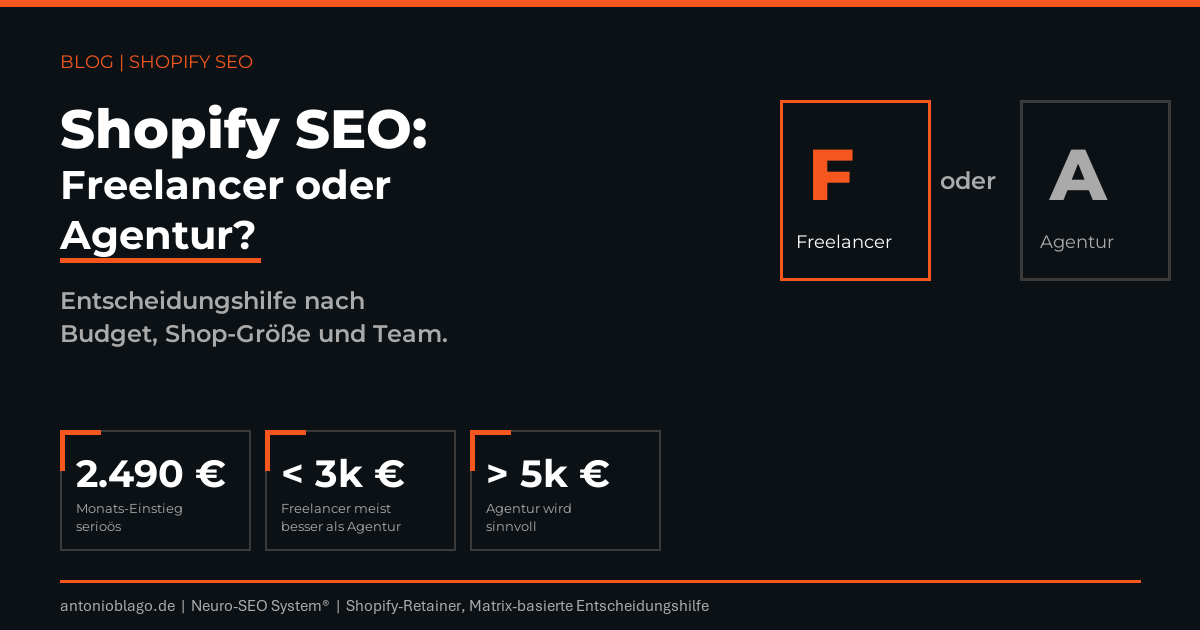
- Shopify SEO: freelancer or agency?
Relaunch and redirects
- Shopify relaunch: why missing redirects cost traffic
- Automating Shopify redirects with Python and Matrixify
- Planning international Shopify redirects
Case studies
Shopify SEO means setting up a Shopify store so that Google and AI search systems find its collections and products, understand them and show them for the right searches. Shopify takes a lot off your plate: the sitemap, robots.txt, canonical tags and hreflang run automatically. The rest is your call: which pages get indexed, how your collections are cut, what your products are called and whether your product pages have enough content to answer a search.
How do you do SEO for Shopify? The short answer, in the order I tackle it in client projects:
- Set up Google Search Console, submit the sitemap and check which pages are indexed.
- Pick keywords with purchase intent and give every page one search intent: advice articles for questions, collections for comparing, product pages for buying.
- Make collections the most important pages of the store, with their own copy, title and internal links.
- Write product pages in your customers' language and add structured data and alt text.
- Clean up the technical side: duplicate URLs, filter URLs, apps and page speed. Then international markets, migrations and AI search.
For me, SEO for a Shopify store is a strategic topic. It decides whether a store depends on Google Ads, social ads and discount campaigns forever or whether part of the demand comes in on its own. The platform gives you a solid technical base but sets firm limits on URLs, robots.txt and redirects. What moves revenue in the end are the collections, the product pages and whether your range is named the way your customers search.
Below I walk through Shopify SEO the way I approach it in audits and client projects: what Shopify does out of the box and where the platform sets limits, then the core part, the ten biggest Shopify SEO mistakes I keep seeing with e-commerce clients, with examples and fixes. After that come technical SEO, bulk optimization with apps and Matrixify, international markets and migrations, AI search and measuring results. For the deeper topics I link to the articles in this series; you will find all parts at the end.
Why Shopify SEO is a strategic topic
A store without SEO pays for every visitor. Search engine advertising only works as long as you pay. An organic click on a collection comes back, and a well-built collection brings in new buyers every month without a bigger budget. On top of that comes AI search: ChatGPT and Google AI Overviews draw on the same pages that rank well on Google.
How does the Shopify platform affect rankings on a technical level? Less than many people think. Google ranks Shopify stores like any other website. Whether you become visible depends on three things: every important search has a matching page, that page is better than the alternatives in the results, and Google finds it without detours through duplicates and filter URLs. That also tells you who in the business is involved in SEO: the product team with the names, the e-commerce team with copy and collections, the agency with the theme.
Which SEO features does Shopify have built in?
Shopify is a hosted e-commerce platform. For search engine optimization this means Shopify handles servers, SSL, the sitemap and the basic settings, while code and URL structure are only reachable through the theme. For most online stores that is a good starting point. The overview shows how the work is split:
| Area | What Shopify does automatically | What you have to do yourself |
|---|---|---|
| Sitemap | creates and updates sitemap.xml with all languages[3] | submit it in Search Console, hide admin collections |
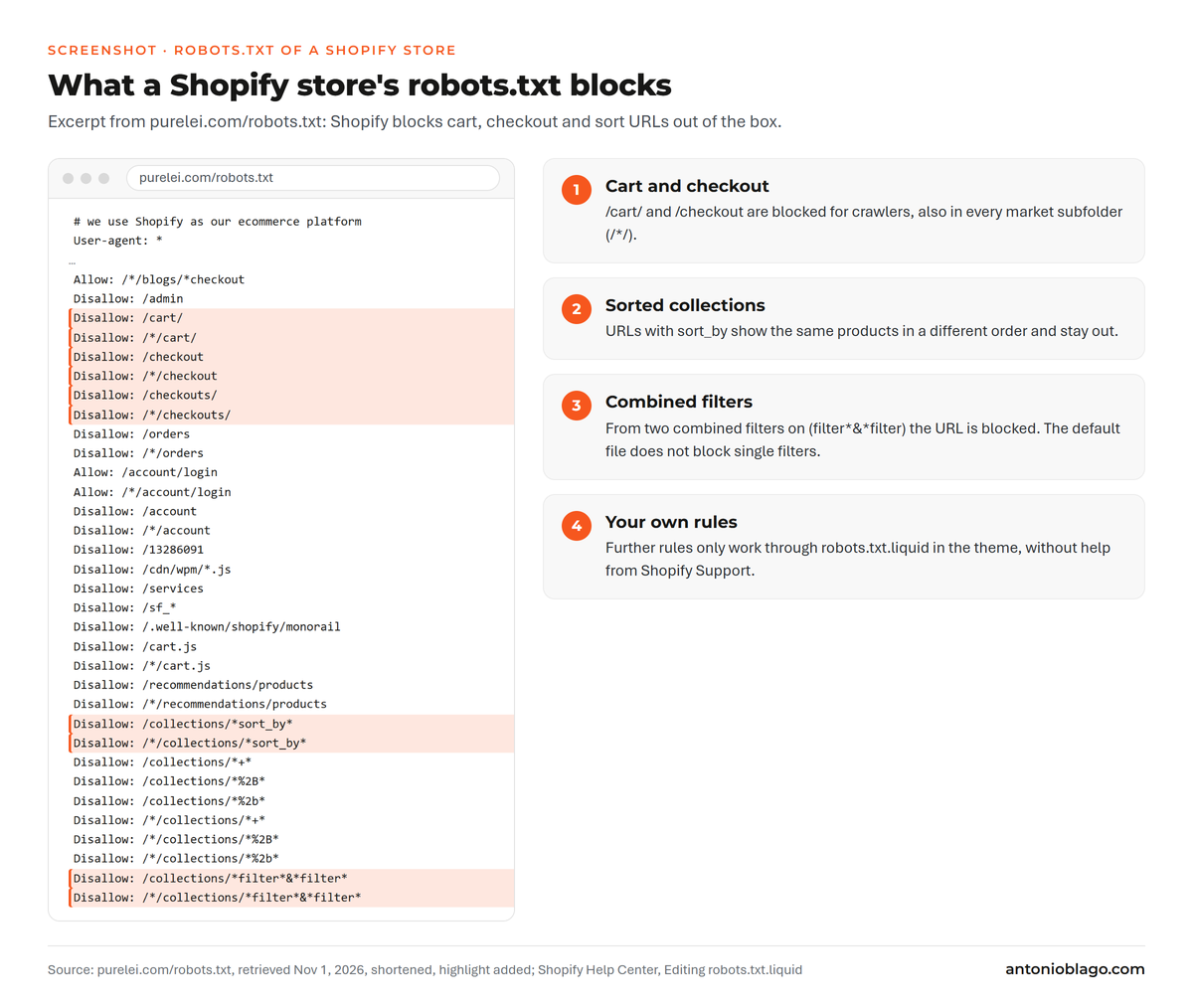
| robots.txt | blocks cart, checkout and sort URLs[2] | custom rules only via robots.txt.liquid in the theme |
| Canonical tags | common themes set them on every page | always link the canonical URL internally[9] |
| hreflang | for every domain and market subfolder[6] | decide which markets need their own URLs |
| Title and meta description | fields per page, otherwise a fallback from product name and copy | write them per page, with the page's keyword[1] |
| Redirects | a checkbox when you change a handle | build complete lists for migrations and rebuilds[4] |
| Structured data | most themes output product markup | close the gaps in breadcrumbs, organization, reviews and shipping[11] |
| Page speed | fast servers and a CDN | keep apps, images and theme code under control[12] |
What Shopify handles automatically
- Sitemap: every Shopify store automatically creates a sitemap.xml with products, collections, pages, blog posts and each product's main image. It updates with every change, and it also adds additional languages automatically[3]. You submit it once in Google Search Console.
- robots.txt: the default file blocks the cart, checkout and sorted collection pages for crawlers, so Google can focus on the actual content[2].
- Title and meta description: products, collections, pages and blog posts have their own fields for meta data. Shopify recommends titles of up to 60 characters and a unique, clearly written meta description for each page[1].
- Canonical tags and hreflang: common themes add a canonical tag to every page, and Shopify creates the hreflang tags itself for every international domain and subfolder[6].
- Redirects: you create 301 redirects in the admin or import them as a CSV file[4].
The biggest SEO limitations of Shopify
- Fixed paths: products always live under
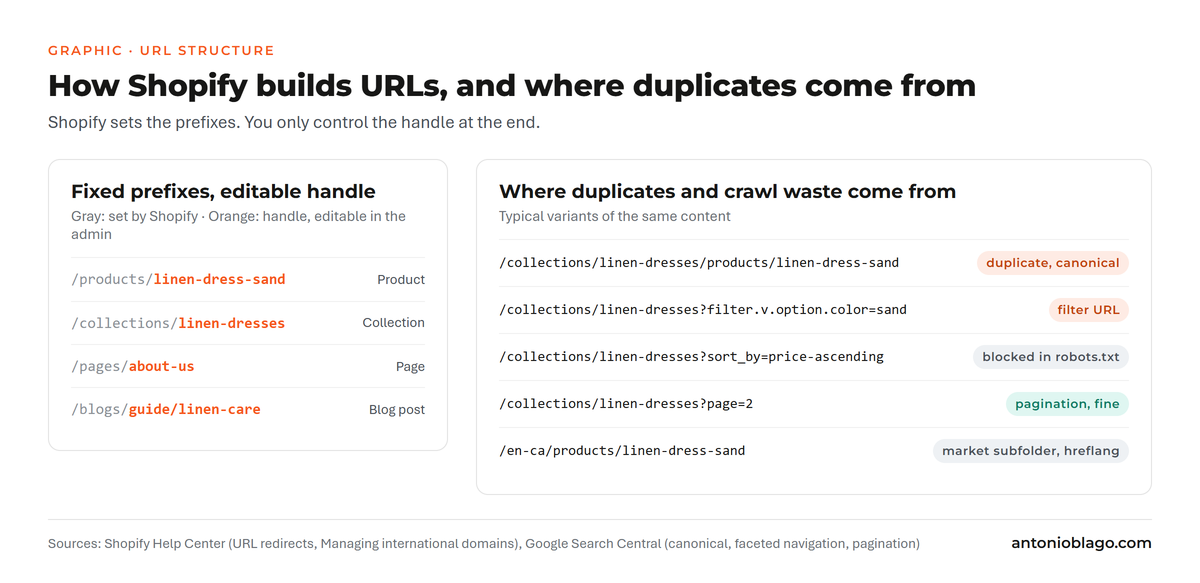
/products/, collections under/collections/, pages under/pages/. You only change the handle at the end, Shopify's version of the URL slug. Google recommends descriptive words in the URL[13]; you get there with good handles, while a custom folder logic like/women/shoes/is only possible through apps or headless. - robots.txt: custom rules go into a robots.txt.liquid file in the theme. Shopify Support does not help with it, and according to Shopify, wrong rules can cost you all your traffic[2].
- Redirects: a redirect only fires when the old URL returns a 404 error. A store can create up to 100,000 redirects, 20 million on Shopify Plus[4].
- Theme and apps: they control headings, scripts and structured data. Whatever the theme outputs wrongly, you fix in the theme code; there is no field for it in the admin.
Shopify, Shopify Plus or WooCommerce?
For SEO, Shopify and Shopify Plus differ mainly in their limits, for example 20 million instead of 100,000 redirects[4]. The ranking levers are the same for both. WooCommerce runs on WordPress and lets you shape the URL structure, robots.txt and server freely. You pay for that with maintenance: updates, hosting, plugins and page speed are on you. From my projects: for stores with a small team, Shopify is the calmer platform. Switching platforms purely for SEO rarely pays off, because every move is a risk to visibility in itself.
How visible is your brand in ChatGPT and friends?
The AI Check shows you within minutes whether and how AI assistants mention your brand.
The biggest Shopify SEO mistakes I keep seeing with e-commerce clients
Most Shopify stores I look at do not have a technical problem. What they lack is a decision about which page should rank for which search. The ten mistakes below come from audits, project calls and first calls between May 2025 and October 2026[17]. For each one I describe how to spot it, an example from practice and the fix in Shopify.
- Keywords that are too generic, without purchase intent and without long tail
- Collection pages without copy and without their own search intent
- On-page SEO gaps on product pages
- Products named the way the team talks, not the way customers search
- Incomplete structured data
- Missing or generic alt text
- Poor performance because of apps, images and theme
- No deliberate internal linking
- No thought-through customer journey
- What else I find regularly
Mistake 1: Keywords that are too generic, without purchase intent and without long tail
How to spot it: the home page and main collections target one-word terms like "cosmetics" or "jewelry". Marketplaces like Amazon and eBay, big retailers and advice portals rank there. The store sits on pages 3 to 5, and in Search Console almost every click comes from the brand name.
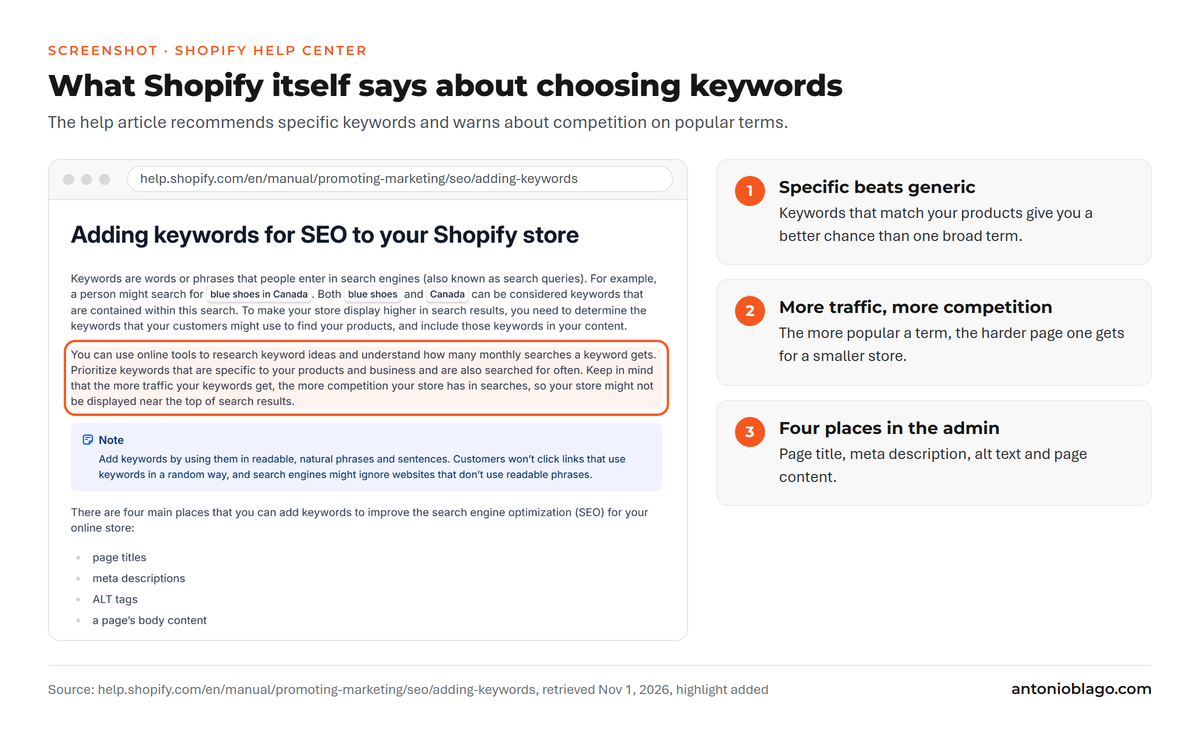
From practice: a generic short-head keyword with lots of search volume looks tempting in a keyword list. For a niche store it is usually too hard, and the people searching often want information first. With a beauty brand in October 2026 we therefore decided to tackle collections with clear purchase intent first, right after page speed, meaning concrete product types like lipstick or eyebrow pencil[17]. Shopify's own help recommends keywords that are specific to your products and points out that popular terms mean more competition[1].
The fix: weigh three things against each other for every search term, using your keyword tool: search volume, difficulty and purchase intent. Performance-oriented terms often have less volume but bring buyers. How do you compete with established brands in Google search as a small Shopify store? Through these specific queries, where marketplaces and big retailers have no matching page. Assign each search term exactly one template:
| Type | Example search | Volume | Difficulty | Purchase intent | Template in Shopify |
|---|---|---|---|---|---|
| Short head | jewelry | high | very high | unclear | home page, rarely reachable |
| Mid tail | gold bracelet women | medium | medium | high | collection |
| Long tail | double layer gold bracelet stainless steel | low | low | very high | product page or sub-collection |
| Informational | is gold plated jewelry waterproof | medium | low to medium | low | blog article, linking to the collection |
Long-tail queries bring little on their own, but together they often bring more revenue than the one big term. They also belong in the title, the H1 and the copy of the matching collection or product page.
Mistake 2: Collection pages without copy and without their own search intent
How to spot it: collections consist of nothing but a product grid and filters. Important subtopics only exist as filter options, and collections barely show up for generic searches in Search Console.
From practice: collections are Shopify's category pages. They rank for generic keywords such as "linen dress women" or "vitamin d drops". Product pages tend to pick up brand and model searches. At a beauty brand in October 2026, subtopics like cleansing or redness only existed as filters; one click created parameter URLs with noindex. For Google, these topics did not exist[17]. At an outdoor sports brand in early 2026, generic searches made up a small share of organic traffic, and Google had not indexed a collection without its own content at all[17].
The fix: my rules for collections:
- One collection per search intent: when people search for a problem or use case, that topic needs its own collection with a URL, title, copy and matching products. At the beauty brand, the make-up collection was in good shape; topics without a parent collection lacked context, for Google as much as for AI systems[17].
- Minimum size: I dissolve a collection with only one product and redirect it to that product. As a rule of thumb, a collection pays off from about five products; that is what I agreed with a health store in August 2025[17].
- Copy in the right place: two or three sentences above the product grid that answer the search, and a longer section below with buying advice or an FAQ. That way the products stay at the top and the page still has SEO content. In Shopify you maintain this in the collection's description field or through a metafield block in the theme.
- Merge collections: at the outdoor sports brand we cut down the number of collections and also connected the product finder to the remaining ones[17]. Twenty strong collections do more than two hundred empty ones.
Mistake 3: On-page SEO gaps on product pages without original content
How to spot it: the product page consists of images, price and variant picker, and the copy is the manufacturer's text or two sentences long. An on-page audit shows duplicate H1 heading tags or dozens of H2s from the theme.
From practice: at a jewelry store in February 2026, many product pages consisted only of images, price and variant picker[17]. The beauty brand's product pages had two H1s and eleven H2s, and the second H1 came from the theme code; it could not be switched off in the theme editor[17].
The fix: Google and AI systems need text to understand a product: material, dimensions, use, care and how it differs from similar products. Manufacturer descriptions that appear word for word in twenty other stores do little for that. My product descriptions follow a fixed structure with seven content blocks, and before writing I check which search intent sits behind the keyword[18]. Good SEO copywriting for products answers the questions that would otherwise end up with customer service. You fix the duplicate H1 in the theme code of the product template. An on-page SEO audit per product URL covering title, description, canonical, robots, headings, Open Graph, JSON-LD, alt text and word count finds these issues in minutes[18].
Mistake 4: Products named the way the team talks, not the way customers search
How to spot it: products carry fantasy names, collection names or internal English labels from the product team. The product type people actually search for appears neither in the title nor in the H1.
From practice: at a beauty brand in September 2026, the product names were fixed before anyone had looked at keywords. The e-commerce team wrote product copy from the product team's briefing. My suggestion was to flip the order: keywords first, then product name, then product sheet and copy. A product name only pulls in search once the product is known; what works best is combining the brand term with a generic term[17]. At the same store, a product was called "Advent calendar" internally and publicly; I aligned the title and meta description with "beauty advent calendar", while the product name stayed[17]. A home textiles store told me in August 2026 that customers call to ask whether a renamed category still contains the same products[17]. Wording is also a matter of trust.
| Page | Before: internal name | After: title and H1 in customer language |
|---|---|---|
| Product | Aria | Aria linen dress, knee length, sand |
| Product | Repair Balm | Repair Balm: lip balm for dry lips |
| Product | Advent calendar | Beauty advent calendar with 24 skincare products |
| Collection | Summer Essentials | Summer dresses for women |
The fix: the product name can carry the brand. The title, the H1 and the first sentence of the description also name the product type and the key feature. You edit the title in the product's search engine listing section using the admin, and for many products through Matrixify columns. For existing products, only change the handle together with a redirect.
Mistake 5: Incomplete structured data
How to spot it: price, availability or stars are missing in search results. The Rich Results Test or the Schema Markup Validator shows Product, but without reviews, without shipping and returns, and there is no BreadcrumbList.
From practice: structured data in JSON-LD format tells Google that a page shows a product with price, availability and reviews. Google distinguishes product snippets for pages that describe products and merchant listings for pages where you can buy directly[11]. Most themes output product markup, often without reviews, shipping costs and returns. At a health store in November 2025, the collections contained two breadcrumbs, both from the theme[17]. Duplicate building blocks from theme and app are something I see often.
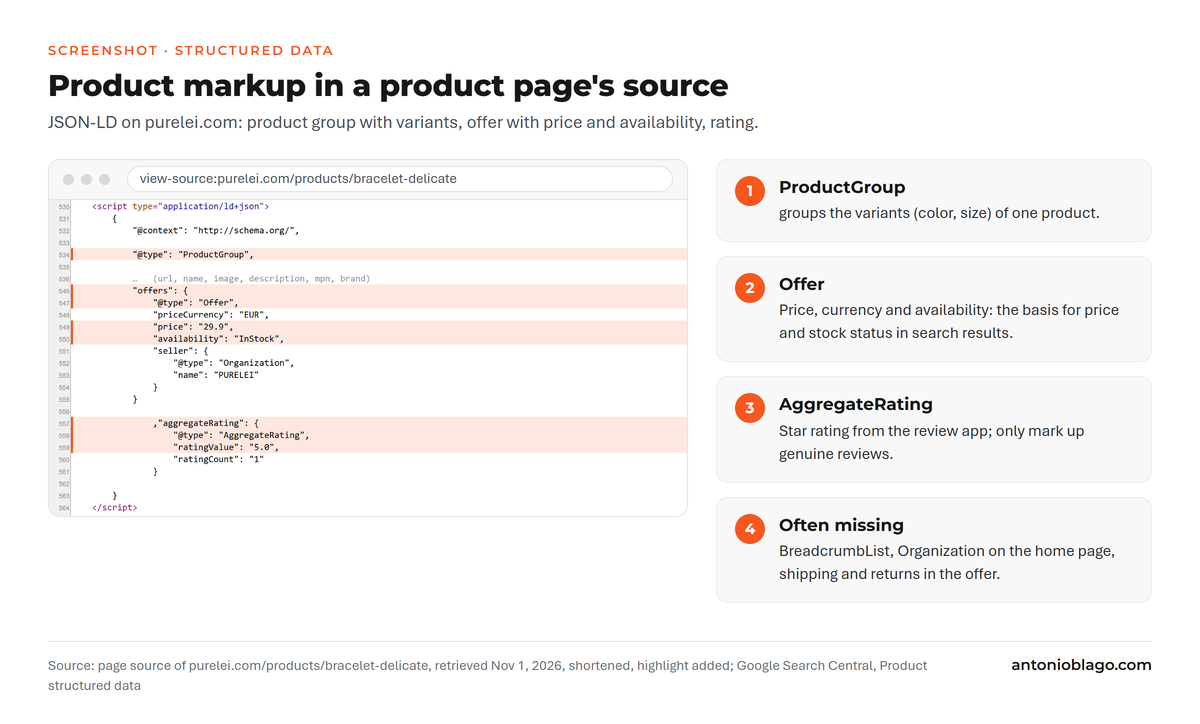
The fix: check for every template which markup comes through, and close the gaps in the theme or with an app:
| Schema type | Template | Where it usually comes from | Common gap |
|---|---|---|---|
| Product or ProductGroup | product page | theme | variants missing, GTIN empty |
| Offer | product page | theme | shipping and returns missing[11] |
| Review and AggregateRating | product page | review app such as Judge.me, also Loox or Yotpo | duplicated by theme and app |
| BreadcrumbList | product and collection | theme, often not at all | missing or duplicated[20] |
| Organization | home page | theme or app | logo, contact, sameAs missing[21] |
Reviews are a source of content as well. For a sports brand I pulled the most frequent themes on fit, comfort and performance from customer reviews and turned them into five FAQs per product in German and English with FAQPage markup[18]. Also check the result of every change using Google's Rich Results Test.
Mistake 6: Missing or generic alt text
How to spot it: in the on-page SEO audit, many product images have no alt attribute, or every image carries the product name. Sometimes the alt text is a keyword list.
From practice: alt text is the core of image optimization: it describes an image for screen readers and image search. Google recommends descriptive alt text that relates to the page content and advises against keyword stuffing[22]. In my experience, apps that generate alt text automatically mostly deliver generic results; a partner confirmed that to me in September 2025[17].
| Before | Problem | After |
|---|---|---|
| (empty) | image without description | Double layer bracelet in gold-plated stainless steel with small beads |
| IMG_4711 | file name instead of content | Aria linen dress in sand, side view |
| bracelet gold bracelet buy bracelet cheap | keyword list | Gold bracelet on the wrist, paired with a fine chain |
The fix: you edit alt text directly on the image in the product, or for many images through the Admin API. I generate it using a script, the product data and fixed rules, with a maximum of 125 characters[18]. Every image gets its own text that says what can be seen: color, view, detail.
Mistake 7: Poor performance because of apps, images and theme
How to spot it: PageSpeed Insights shows red values on mobile, and the Core Web Vitals report in Search Console lists many URLs as "poor". Good values are a Largest Contentful Paint under 2.5 seconds, an Interaction to Next Paint under 200 milliseconds and a Cumulative Layout Shift under 0.1[12].
From practice: Shopify also provides fast servers and a CDN. A store almost always gets slow through its theme and apps: every app for reviews, pop-ups, chat or tracking loads its own scripts. With the beauty brand in October 2026, we put page speed and readability first on the list of measures, ahead of the collections[17]. There, a large part of the content only reached the page via JavaScript, and that was the main technical blocker[17]. A developer friend warned me in August 2025 about third-party scripts in the theme that nobody removes after an app is uninstalled[17].
The fix: how to improve page speed:
- Go through your apps, remove unused ones and then search the theme code for leftovers.
- Resize product images before uploading; load the main image at the top of the page without delay.
- Limit third-party fonts and scripts, and bundle tracking in the tag manager.
- Output the content that should rank directly in the HTML, without loading it later via JavaScript.
- Measure after every change using PageSpeed Insights and in the Core Web Vitals report.
Mistake 8: No deliberate internal linking
How to spot it: important collections only hang in the menu, blog posts link to no product, and product pages do not point back to their collection. Some pages have no internal link at all.
From practice: at a health store in August 2025, internal links consistently pointed to product URLs with the collection path, and my recommendation to the agency in charge was to change that in the theme[17]. In my e-commerce workshop in June 2026, a long discussion revolved around how breadcrumbs built from categories and products create different URLs[17].
How do I build an internal link structure in Shopify? Internal links show Google which pages in the store matter. In Shopify you have five places for this: the main menu, the breadcrumbs in the theme, text links in collection and blog copy, related products and product recommendations. My order:
- Every important collection gets a spot in the menu or in a parent collection.
- Collection copy links to matching sub-collections and related topics.
- Blog articles link to the matching collection with descriptive anchor text.
- Product pages link back to their main collection through the breadcrumb and related products.
- For paginated collections, the follow-up pages link to the first page[8].
Mistake 9: No thought-through customer journey
How to spot it: the store has product pages and a few collections but no page for questions before the purchase. Or the blog has many articles that lead to no product. Informational searches land on product pages, buying searches on blog posts.
From practice: at a home textiles store in August 2026, Google associated the towel collection with a material topic, while the store wanted to be found for a quality search. The decision in the call: align the H1 with that search, expand the copy and measure for a month[17]. With the beauty brand we planned the order along the journey: collections first, then advice articles, then technical work[17].
The fix: assign a template to each phase and check where the gap is:
| Phase | Search intent | Template in Shopify | Example search |
|---|---|---|---|
| Recognize the problem | informational | blog post, advice article | dry lips remedy |
| Compare solutions | comparison | collection with buying advice, comparison table | best lip balm |
| Choose a product | commercial | collection or sub-collection | vegan lip balm |
| Buy | transactional | product page | [brand] repair balm buy |
| After the purchase | help, repurchase | page (pages), FAQ, blog | how to apply lip balm |
If a row is missing, you are missing an entry point into the store. Advice articles pick people up early and pass their links on to the collections, and the collections lead to the product.
Mistake 10: What else I find regularly
- Product links with a collection path: the theme links
/collections/x/products/yinstead of the canonical URL; details in the technical section. - Filter URLs in the index, or subtopics only as filters: see filters, parameters and pagination.
- Admin collections in the index: discount or test collections that should go out via
seo.hidden. - Variants as separate products: every color as its own product without its own copy or canonical; a few hundred products quickly turn into thousands of near-identical pages.
- Empty title fields: Shopify then uses the product name and the store name, often too long or without the product type.
- Migrations without complete redirects: see redirects during a relaunch or migration.
Technical Shopify SEO: crawling, duplicate content and indexing
Technical SEO decides whether Google crawls and indexes the right pages. Duplicate content rarely costs you a penalty. It does, however, spread signals across several URLs, and Google has to guess which one should rank.
Product URLs with a collection path
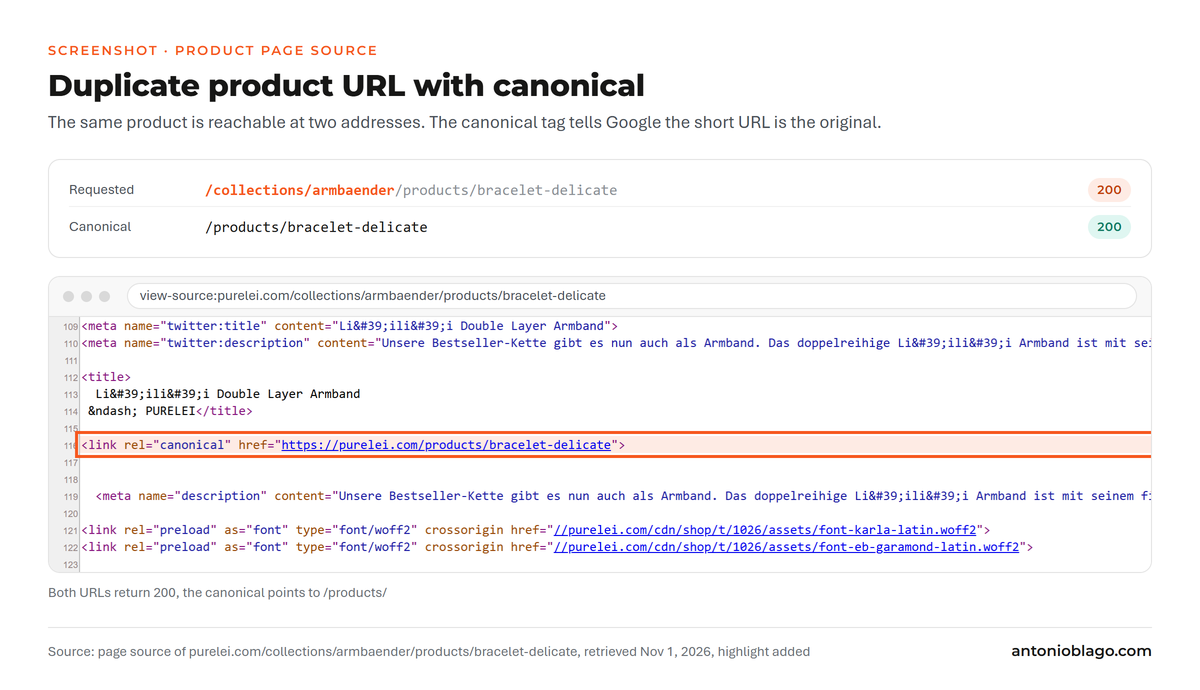
Every product is reachable at /products/handle. Many themes also link to it from a collection as /collections/name/products/handle. On that variant, Shopify sets a canonical tag pointing to the short URL. A canonical is a strong signal for Google; if internal links contradict it, Google can still choose a different URL[9]. The cause is usually the Liquid filter within: collection in the product cards. Without it, the store links straight to the canonical URL, the way PURELEI does in its collections.
Filters, parameters and pagination
Filters in collections create URLs with parameters, for example for color, size or price. Google describes the problem in its documentation on faceted navigation: to crawlers, such URLs always look new, they get fetched in large numbers and slow down the discovery of the important pages. If the filter URLs should not be indexed, Google recommends preventing them from being crawled, for example via robots.txt[7]. If a filter topic has its own search demand, it gets a real collection, as described in mistake 2.
For the follow-up pages of a collection, Google's pagination guidance applies: every page gets its own URL, page 1 is not the canonical for the follow-up pages, and page numbers do not sit behind a # in the URL[8]. Shopify themes handle this cleanly with ?page=2. Infinite scroll apps that load more products without their own URL cause more trouble.
Hiding pages on purpose
Not every page belongs in the index: admin collections for discount campaigns, test products or internal landing pages for campaigns. Shopify offers two ways to handle this. The metafield seo.hidden with the value 1 removes a page, a blog post or a product from the sitemap, search engines and the store search. The product status Unlisted also hides a product from collections and recommendations[5]. At the beauty brand we removed the admin collections from the index this way in September 2026[17]. In my audit pipeline, a script reads seo.hidden first, so that I only check indexable pages for missing titles and descriptions[18].
A limit many people do not know about: Shopify throttles automated requests. When crawling a jewelry store in February 2026, 429 errors appeared after a few requests, and the crawl only went through with a one-second pause per request[17]. For your own audits, that means: set the crawler to a slow pace and cross-check the results with Search Console.
Shopify SEO apps: free, paid or your own workflow?
The Shopify App Store has dozens of SEO apps such as SEOAnt or Plug in SEO, free and paid. They fill in meta data, generate alt text, add structured data or flag broken links. For a small store without a tech budget, a good app is a sensible start. Free versions usually cover only part of the features, while the paid ones handle bulk tasks faster. Both write copy from templates that reads the same in many stores. For larger stores there is a second point: every app loads scripts, writes code into the theme, and something often stays behind after uninstalling[17]. So are SEO tools better than manual optimization? For the grunt work, yes. Which pages should rank for which keywords is still your decision, and that is where the bigger lever lies.
| Approach | Good for | Limits | When I use it |
|---|---|---|---|
| SEO app | getting started, error alerts, simple bulk tasks | template copy, scripts in the theme | small store without a tech budget |
| Theme changes | H1, breadcrumbs, structured data, product links | needs a developer, never directly in the live theme | errors that occur on every page |
| Matrixify | export and import of titles, descriptions, redirects, alt text | spreadsheet work, mistakes hit every row at once | hundreds of products or migrations |
| Admin API with scripts | repeatable workflows, multiple languages, matching with Search Console | needs safety rules and a dry run | large stores and ongoing optimization |
Keyword research, titles and meta descriptions at scale
Meta tags are the part of your page that users see first in the SERP. With 20 products you write them by hand; with 2,000 products in five languages you need a process. Mine looks like this[18]:
- Pull all products, collections and language versions through the Shopify Admin API and join them with data from Google Search Console.
- Do the keyword research per URL and set one main keyword and two secondary keywords; keywords containing brand names only above a minimum search volume.
- Write titles of 50 to 60 characters and descriptions of 145 to 155 characters, only for empty or weak fields. Shopify itself recommends a maximum of 60 characters for the title[1].
- Take a backup, then do a test run with three products, check them in the store, and only then do the rest.
- After the push, pull everything again and compare it with the plan.
Without the API, the same also works using Matrixify: export, fill in the columns for SEO title and SEO description, import. How I combine Matrixify and Python for redirects is covered in Automating Shopify redirects with Python, sitemaps and Matrixify.
For the API I work using Claude Code as an agent that runs the steps[18]. To make sure nothing breaks, fixed rules apply: handles are never changed, nothing is written directly into the live theme, every run starts as a dry run without write access, and writes happen in batches of at most 50 products, only after an explicit approval phrase for that specific store[18]. How such an agent is set up is explained in the Claude Code guide.
Whether you handle the SEO work yourself, with a freelancer or with an agency depends mainly on budget and team. The decision guide with budget tiers is in Shopify SEO: freelancer or agency?. If you are looking for support for your store, you can find my offer as a Shopify SEO freelancer.
International Shopify SEO: Markets, hreflang and redirects
International SEO is where Shopify stores get messy fastest. With Shopify Markets you create a market per country or region and choose a separate domain, a subdomain or a subfolder. For getting started, Shopify recommends subfolders like /en-ca or /fr-ch, because they take little effort and send visitors to the right version automatically. Language folders without a country, like /fr, only exist in the primary market[6]. Shopify sets the hreflang tags itself and adds all languages to the sitemap[6]. Google requires every language version to list itself and all others, and recommends x-default for visitors without a matching version[10].
The problem is volume. At an outdoor sports brand, international sales ran through Shopify Markets with Global-E, with one subfolder per country. One product range turned into millions of URLs that need crawling and barely differ in content[17]. Our approach: merge markets with the same language and range, and redirect the English country folders to one shared English version. For that I generated a six-figure number of redirects by script[18]. Important: in Shopify, a redirect does not automatically apply to every market subfolder; each folder needs its own entries[4]. For international SEO this means: first decide which markets have their own content and their own search demand, then build the URLs. How to plan this with subdomains, slugs and sitemap fallbacks is covered in Planning international Shopify redirects.
Redirects during a relaunch or migration
Every move to Shopify changes the URLs, because the paths are fixed. Without complete redirects, the store loses rankings, backlinks and revenue. The biggest project of this kind was moving a premium fashion brand from Shopware to Shopify: more than 50,000 old URLs consolidated into around 5,000 new ones, with the redirect mapping done over one weekend[16]. The full story is in Shopify relaunch and SEO: why missing redirects cost traffic.
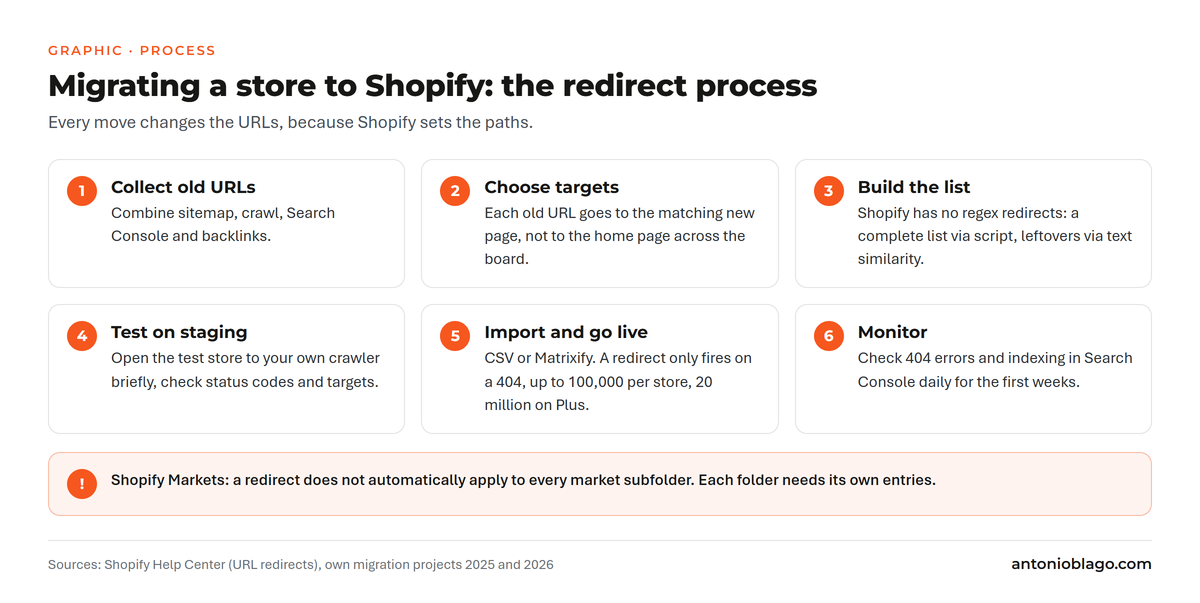
Three lessons from projects like this[17]:
- Shopify has no regex redirects. A pattern like "everything under /shop/ to the matching collection" has to be built as a complete list. I do that using Python with the old sitemap, a crawl and the new product list; for the leftovers, matching by text similarity or embeddings finds the right target[18].
- Do not put IDs into new URLs just to make the mapping easier. Handles stay for years, and so does the workaround.
- Open the staging system to your own crawler briefly before going live and test the list there. After the headless relaunch of an outdoor brand, 404 errors rose sharply and a large share of organic traffic only landed on the home page.
SEO checklist before a Shopify store goes live
I go through this SEO checklist before every launch, whether it is a new store, a theme change or a migration:
- Password protection and noindex of the test store are removed for the launch.
- Every old URL has a redirect target, tested on staging.
- The most important collections have a title, meta description, H1 and intro copy.
- Product cards link to
/products/without the collection path. - Every page has exactly one H1.
- Product markup, BreadcrumbList and Organization pass the Rich Results Test.
- Admin and test collections are hidden via
seo.hidden. - Images are resized and have alt text.
- Unused apps and their scripts are removed, and the Core Web Vitals are measured.
- The sitemap is submitted in Search Console, and the markets are checked for hreflang.
- A daily look at 404 errors and indexing is scheduled for the first weeks.
Shopify SEO for AI search
ChatGPT, Perplexity and Google AI Overviews now recommend products and stores. For Shopify stores this is measurable revenue: PURELEI made around 25,000 euros through AI channels in twelve months, mostly via ChatGPT[15]. The foundation for that was classic SEO. Stores that rank well on Google get found and cited more often by AI systems. For AI search, four points come on top:
- Context through collections: AI systems classify products by topic. If the parent collection is missing, so is the context, as with the beauty brand above[17].
- Answers on the page: FAQs based on real customer questions, comparison tables and clear details on material and use are easy to cite.
- Access for crawlers: Shopify rate-limits automated requests, and that also affects crawlers from AI services[17]. Whether your pages get through shows up in tests with the services themselves.
- llms.txt: a file that tells AI systems which pages of the store matter most. My generator takes the Shopify structure of products, collections and languages into account[18]. Whether AI services actually read the file is still open; the effort is small.
The full analysis with prompts, competitors and revenue is in the Shopify GEO case study with PURELEI.
Measuring success and setting priorities
Search engine optimization takes weeks to months to show results. To see which measure did what, you need two things: data from Google Search Console and a log of what went live when. For every client I keep a running log of every change, with the Search Console time series alongside it[18]. For stores with many markets, the Search Console interface is not enough. That is where the bulk export to BigQuery helps, which stores the data daily[19]; for the outdoor sports brand, it was the only way to analyze the millions of market URLs[17]. How to read the reports is covered in my Google Search Console guide.
PURELEI shows what this can deliver. From October 2024, we rebuilt the store for organic search. After eight months, visibility had doubled (SISTRIX index from 2.5 to more than 5.8)[14]. According to the case study, organic traffic grew by around 30 percent, and the store generated more than 600,000 euros in organic revenue[14]. All measures and figures are in the Shopify SEO case study for PURELEI.
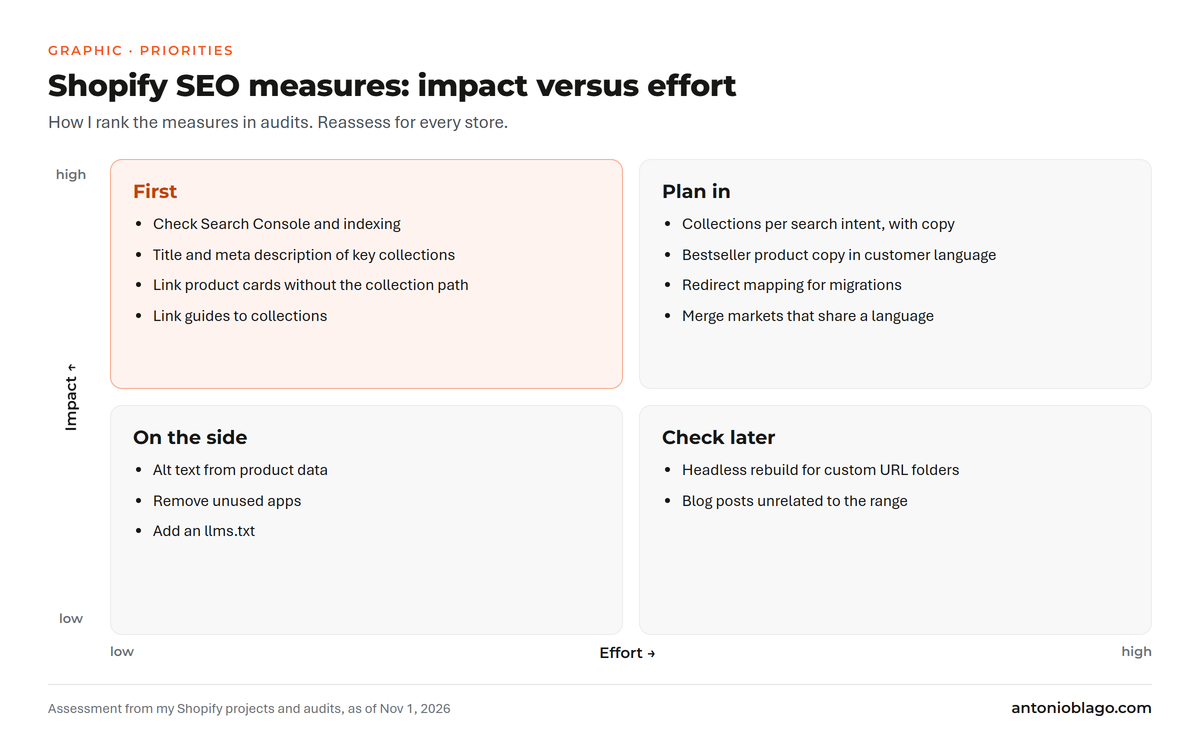
Which measure comes first, I decide by impact and effort, using the matrix below:
Shopify SEO checklist for beginners and small budgets
If you are new to Shopify, run a new store on a limited budget or work without coding skills, this SEO checklist sets the priorities:
- Set up Google Search Console, submit the sitemap, check indexing.
- Define the ten to twenty most important collections, align them with purchase-intent keywords and give them a title, meta description and intro copy.
- Check technical duplicates: collection paths in product links, filter URLs, admin collections.
- Give your bestsellers' product pages original copy in customer language, alt text and complete structured data.
- Go through your apps, remove unused ones, then measure Core Web Vitals.
- Only then move on to the blog, international markets and AI search.
You can handle the first four points in the Shopify admin without code. In my experience, the first measurable results usually come from the collections.
Shopify SEO FAQ
What SEO mistakes do Shopify store owners make most often?
In my audits it is the same ones again and again: keywords that are too generic, collections without copy, product pages without original content, product names without the product type, incomplete structured data, missing alt text, apps that slow down the page and missing internal links[17]. The full list with fixes is above under The biggest mistakes.
Is Shopify good for SEO?
Yes, for most stores. The sitemap, robots.txt, canonical tags, hreflang and redirects are built in[2][3][6]. The weak spots are the fixed URL paths, limited control over robots.txt, and themes and apps that weigh on code and page speed.
Do I need an SEO app for Shopify?
Usually not at the start. You maintain titles, meta descriptions, alt text and redirects in the admin. An app pays off for bulk tasks or for structured data if your theme does not provide it. With many products, a workflow via Matrixify or the API is often cleaner.
Can I change the URL structure in Shopify?
Only the handle at the end of the URL. Shopify sets the paths /products/, /collections/ and /pages/. If you change a handle, the old URL needs a redirect to the new one[4]; Shopify offers a checkbox for this when you save.
How long does it take to see SEO results for a Shopify store?
Technical fixes and new titles often show up in Search Console within a few weeks. New collections and content take three to six months in my experience. At PURELEI, visibility had doubled after eight months[14].
What should I watch for when migrating to Shopify?
Before the move, collect all old URLs (sitemap, crawl, Search Console, backlinks), map each one to a matching new target and test the list on staging before going live. After launch, watch 404 errors and indexing in Search Console daily. The go-live checklist above sums up the points, and the details are in the redirect series, starting with Shopify relaunch and SEO.
Should I hire a Shopify SEO expert or do it myself?
You can implement the basics from this article yourself. An SEO agency or a specialized freelancer pays off once migrations, multiple markets or thousands of products come into play. With any agency, check who actually works on your store day to day and whether they know Shopify themes and Matrixify. How to decide based on budget is covered in Shopify SEO: freelancer or agency?.
Conclusion
Shopify takes care of the technical basics. Rankings only come once your keywords match purchase intent, collections reflect search demand, products are named the way customers search and product pages have enough content. My order: Search Console and indexing, keywords and customer journey, collections, product pages with structured data and alt text, technical duplicates and page speed, then international markets and AI search. For each of these steps there is a deeper article in the series, and the series keeps growing.
All parts of the Shopify SEO series:
Guide series
- Shopify SEO guide: more visibility for your store (this article)
- Shopify SEO: freelancer or agency?
Relaunch and redirects
- Shopify relaunch: why missing redirects cost traffic
- Automating Shopify redirects with Python and Matrixify
- Planning international Shopify redirects
Case studies
- Shopify SEO case study PURELEI: 600,000 euros in 8 months
- Shopify GEO case study PURELEI: 25,000 euros from ChatGPT
Sources
- Shopify Help Center: Adding keywords for SEO to your Shopify store (titles, meta descriptions, choosing keywords), accessed 1 November 2026
- Shopify Help Center: Editing robots.txt.liquid, accessed 1 November 2026
- Shopify Help Center: Finding and submitting your sitemap, accessed 1 November 2026
- Shopify Help Center: URL redirects, accessed 1 November 2026
- Shopify Help Center: Hiding a page from search engines, accessed 1 November 2026
- Shopify Help Center: Managing international domains, accessed 1 November 2026
- Google Search Central: Managing crawling of faceted navigation URLs, accessed 1 November 2026
- Google Search Central: Pagination, incremental page loading, and their impact on Google Search, accessed 1 November 2026
- Google Search Central: How to specify a canonical URL with rel="canonical" and other methods, accessed 1 November 2026
- Google Search Central: Tell Google about localized versions of your page, accessed 1 November 2026
- Google Search Central: Introduction to Product structured data, accessed 1 November 2026
- Google Search Central: Understanding Core Web Vitals and Google search results, accessed 1 November 2026
- Google Search Central: Designing a URL structure for ecommerce sites, accessed 1 November 2026
- Antonio Blago: Shopify SEO case study for PURELEI, antonioblago.com
- Antonio Blago: Shopify GEO case study with PURELEI, antonioblago.com
- Antonio Blago: Shopify relaunch and SEO, antonioblago.com, plus own project data from the migration (May 2025)
- Own conversations with clients and prospects (project calls, first calls, workshops), May 2025 to October 2026, transcripts stored locally, anonymized
- The author's own tools and workflows for Shopify (skills, scripts and safety rules for Claude Code), as of 1 November 2026
- Google Search Console Help: Bulk data export of Search Console data to BigQuery, accessed 1 November 2026
- Google Search Central: Breadcrumb (BreadcrumbList) structured data, accessed 1 November 2026
- Google Search Central: Organization structured data, accessed 1 November 2026
- Google Search Central: Google image SEO best practices, accessed 1 November 2026
Brand Radar: where does your brand stand?
Brand and generic traffic, competitors and potential at a glance, free of charge.

About the Author: Antonio Blago
SEO Freelancer & AI Visibility Expert
I optimize SEO data-driven with Python, behavioral psychology, and my Neuro-SEO System®. On YouTube, LinkedIn, and Instagram I share hands-on tutorials, insights, and SEO strategies.