WordPress Migration: Moving a Domain into Your Own Web App

AI summary
- I migrated a WordPress site from antonioblago.de to antonioblago.com in September 2026, moving 137 URLs while the source domain received 3,796 clicks versus 310 on the target.
- I created 867 redirect rules from crawl data, sitemap and plugin export because neither plugin lists nor sitemaps revealed legal pages, author archives and legacy category prefixes.
- PageSpeed mobile performance improved from baseline 73 to 94 after migration by inlining critical resources, deferring non-critical ones and removing unused stylesheets and scripts.
- I executed the migration in waves ranked by traffic, with the five top URLs carrying 3,235 clicks going last individually with rollback capability, achieving 90 percent of baseline clicks within twelve weeks.
Generated with AI, the details are in the article.
Table of contents
Three years of WordPress, two domains, two languages: my German website ran on antonioblago.de, my English web app with the SEO tools on antonioblago.com. In September 2026 I merged both and moved the WordPress site completely into my own web app. The uncomfortable truth first: the migration went from the strong domain into the weak one. The .de brought roughly twelve times the clicks.[5]
This article is no tutorial for a migration plugin. It shows how a WordPress migration with a domain move really plays out when you take it seriously: which numbers I collected beforehand, why I moved in waves instead of a big bang, how 867 redirect rules came about, what hreflang forces you to do, and what the target domain delivers on PageSpeed today. At the end there is a twelve-step checklist you can use for your own move.
Starting point: why leave WordPress, and what the numbers said
The reason for the move was the split. The .de held the German blog with case studies, podcast episodes and landing pages. The .com ran the Flask app with the analysis tools and an English blog. Two systems, two hostings, two image folders, two login worlds. Every change to design, consent or navigation had to be made twice.[5]
Before touching anything I wanted to know what was at stake. Search Console over 365 days, as of 18 August 2026:[5]
| Domain | Clicks (365 days) | Backlinks | Spam score |
|---|---|---|---|
| antonioblago.de (WordPress) | 3,796 on 157 URLs | 308 | 55 |
| antonioblago.com (Flask app) | 310 | 406 | 0 |
Two things stood out immediately. First: the target domain had more referring domains than the source, so losing authority was no major risk. Second: the .de traffic depended on very few pages. Four URLs carried around 60 percent of all clicks, the strongest one 1,431 on its own, the next ones 1,002, 394 and 333.[5] Those four URLs were the entire migration risk. Everything else was long tail.
The blocking finding
Matching the 137 migration-relevant URLs against the web app's database produced the real shock: 76 German articles were already stored as published in the database but were never served, because there simply were no /de/blog/ routes. The blog routes filtered hard on English.[5] Had I set the redirects first, every one of them would have landed on a 404 page. Building the routes was therefore the precondition for the migration.
On top came a list of damage that hurt before any move: German articles with German slugs inside the English blog, trailing-slash duplicates with and without the slash, hreflang in one direction only, drafts reachable by anyone who knew the slug, and two keyword pages cannibalising each other across domains.[5] Cleaning up those points became wave 0.
The plan: waves instead of a big bang
If you move from the strong into the weak domain, you cannot afford a moving day on which everything flips at once. So I ranked the 137 URLs by traffic and planned them in waves. The baseline came first: a Search Console export of both properties over twelve months with 20,290 rows, backlink summaries and an inventory of all 134 sitemap URLs with their status codes.[5] Without those numbers you cannot tell later whether the move cost traffic or a Google update got in the way.
| Wave | Content | URLs | Clicks |
|---|---|---|---|
| 0 | Clean-up and baseline | 0 | 0 |
| 1 | Build German blog routes | 0 | 0 |
| 1b | Repair English articles | 63 | EN side |
| 1c | Re-import missing WordPress articles | 15 | low |
| 2 | Long tail without counterpart | 58 | 272 |
| 3 | Mid-field with German version | 74 | 289 |
| 4 | The five top URLs | 5 | 3,235 |
I wrote the success criteria down beforehand so I could not bend them afterwards: organic clicks of both domains combined at a minimum of 90 percent of the baseline after twelve weeks, the five top URLs within plus or minus two positions, no 404 errors on redirected URLs in Search Console, all 76 German articles reachable and indexed.[5]
Google itself sets two guard rails that shape the timeline: redirects should stay in place for as long as possible, generally at least one year, so that all signals including third-party links are transferred to the new URLs.[1] And a domain change calls for a Change of Address in Search Console for the old property.[10]
The technology behind the move: redirects, hreflang, images, hosting
867 redirect rules from crawl, sitemap and plugin export
A redirect plugin in WordPress would not have helped, because WordPress no longer exists after the move. The old domain points via DNS to a tiny redirect service of its own: a Flask app behind gunicorn on Railway that does nothing but map old paths to new URLs.[6] A generator builds the rules from three sources: the export of the old SEO plugin, the sitemap, and a full crawl of the old site with 27,056 links and 1,037 unique internal paths.[6]
The crawl was decisive. Neither the plugin list nor the sitemap knew about the legal pages, the author archives or the old category prefixes that WordPress had been redirecting live for years. Only the comparison against the crawl exposed those gaps. The result: 867 exact rules plus three regex rules.[6]
Just as important as the 301 is the deliberate 410. The old members area with 137 paths and 110 WordPress assets in JavaScript, CSS and fonts intentionally return "Gone" instead of a redirect into nowhere.[6] A 301 that ends on a 404 is worse for Google than a clean 410, because it burns crawl budget in a chain.
hreflang must point in both directions
Before the move, the English articles on the .com pointed via hreflang to their German originals, but the German pages on WordPress did not point back. Google is unambiguous here: if page X links to page Y, page Y must link back to page X, otherwise the annotations may be ignored or interpreted incorrectly.[2] So the language pair was never recognised.
In the new system hreflang is generated from the database. Every German article is linked to its English version through a field, the template renders both directions from that, and the sitemap lists DE and EN automatically. On 3 September all 92 German articles had an English version, the pairs were complete.[7] Add Google's second rule: each language version must list itself as well as all other versions.[2]
Images: what was mirrored and what stays 410
Images tend to be forgotten in migrations, although they sit in image search and in third-party links. I mirrored 349 files from the old upload folder locally and put them into the web app's repository.[6] Of 572 image URLs found in the crawl, 234 are redirected exactly and 180 via their WordPress size variant with a 301 to the original. 173 remain 410: almost exclusively decorative theme and landing-page assets that no longer exist on the new site.[6]
Hosting change and DNS cutover
In parallel to the content migration, the web app itself moved from PythonAnywhere to Railway. Staging first, as a separate instance with a copy of the database, then the DNS change for www.antonioblago.com on the evening of 3 September.[7] Two days later, on 5 September, the second DNS cutover followed: antonioblago.de and www.antonioblago.de have pointed to the redirect service ever since.[6]
One detail that almost caught me: the German home page. As long as /de on the .com still redirected with a 301 to WordPress, the cutover would have created a redirect loop, .de to .com/de to .de. So the German home page had to be live on the target domain before the old domain was redirected.[7]
PageSpeed: from 58 via 73 to 94
A migration is the best opportunity to pay off performance debt, because you touch every line of the layout anyway. The old WordPress site scored 58 for mobile performance on PageSpeed.[12] The target domain's Lighthouse baseline from 6 August 2026, measured with a Moto G Power profile and slow 4G, was sobering: performance 73, accessibility 88, best practices 81, SEO 100. First Contentful Paint 3.8 seconds, Largest Contentful Paint 4.9 seconds. Total Blocking Time 0 ms and CLS 0.001, on the other hand, were perfect.[4] The entire deficit sat in the network waterfall before the first pixel, not in JavaScript or layout.
| PageSpeed mobile | WordPress (.de) | Web app 6 Aug 2026 | Web app 11 Sep 2026 |
|---|---|---|---|
| Performance | 58 | 73 | 94 |
| Accessibility | not recorded | 88 | 100 |
| Best Practices | not recorded | 81 | 100 |
| SEO | not recorded | 100 | 100 |
| First Contentful Paint | not recorded | 3.8 s | see note |
| Largest Contentful Paint | not recorded | 4.9 s | see note |

What made the difference
The August findings read like a checklist of typical legacy: a redirect chain from the bare domain via an unencrypted http stop to the www variant, 395 milliseconds before a single byte of HTML arrived. Ten render-blocking stylesheets, three of them entirely unused. Two blocking scripts in the head. cache-control: no-cache on all own assets. An LCP image without a modern format and without preload. No resource hints for six third-party domains. And every security header missing, which alone pushed the best-practices score down to 81.[4]
The order of work follows what Lighthouse itself recommends: inline critical resources, defer non-critical ones, remove anything unused.[9] Concretely, the stylesheets became one minified bundle, the fonts are hosted locally and preloaded for the visible area, the hero image got responsive variants and a preload, the static assets got long cache lifetimes.[4] One point was left open on purpose: the redirect chain of the bare domain without www still runs through two hops, because it is configured at the DNS provider rather than in code. Anyone typing the address directly still pays those 395 milliseconds. None of this is rocket science. It is the kind of work nobody ever does in a grown WordPress theme with five plugins, because every plugin ships its own CSS.
What came up after the move
With the DNS cutover begins the phase in which real users find the mistakes. Three examples from the first week.
Google Analytics had never run since it was embedded. The tags used the Cookiebot convention, type="text/plain" data-cookieconsent="statistics". My consent manager, however, is CCM19, and it does not evaluate those attributes. It expects its own script loader with type="text/x-ccm-loader" and a group that is tied to the respective embedding in the backend.[11] On top of that, CCM19 was loaded with defer and only observes scripts while the page is parsed. The result: even after "Accept all", the GA4 tag stayed plain text. It only surfaced when I played through the site's cookies with a real browser, once declining, once accepting.[8] The lesson: you test consent embeddings with a real click in the browser.
Outside feedback is gold. Two colleagues from CRO and UX noted seven points on LinkedIn that I had stopped seeing after months in my own layout: descending bars on the case-study preview images that read like a downward trend; a language notice covering the dropdown menu; "Learn more" seven times as link text on one page; a grid using only half the width on large monitors; three floating elements, none of which invited contact; a pale favicon; a main CTA that disappeared into the burger menu on mobile.[8] All seven have been implemented since, and the case-study images now show the actual uplift, such as "+364 %" or "1.2 million euros", instead of a generic graphic.
Old links hide in modules. The podcast overview still linked every episode to the old domain, because the module pulled its data from the WordPress API. The episodes had long been in the new blog. Now the list comes from the app's own database, including the English version and automatic detection of new episodes.[8] No redirect check finds spots like that, because the links technically work, they just take an unnecessary detour.
Checklist: WordPress migration in twelve steps
- Secure the baseline. Export Search Console for both properties over twelve months, file the backlink profile and a URL inventory with status codes.[5]
- Map URLs by traffic. Which URL already has a counterpart in the new environment, which one needs content, which one may die?[5]
- Routes before redirects. Every redirect target must answer with 200 before the first 301 goes live. That is the precondition for everything else.[5]
- hreflang in both directions. Every language version lists itself and all others, otherwise Google ignores the annotation.[2]
- Crawl the old site completely. Plugin export and sitemap know neither the legal pages nor the legacy paths. The crawl does.[6]
- Set 410 deliberately. Whatever has no successor gets "Gone", no redirect onto a 404.[6]
- Secure images before the DNS change. After that the old server is gone, and with it every chance of a rescue.[6]
- Staging before production. Bring the new environment up with a copy of the data and run all gates before touching DNS.[7]
- Home page of the target language first. Otherwise a redirect loop between old and new domain looms.[7]
- Submit a Change of Address in Search Console for the old domain and keep the redirects for at least a year.[1][10]
- Test consent with a real click. Decline, accept, reload, compare cookies and requests. The consent tool's scanner only sees what actually executes.[8]
- Measure after twelve weeks. Clicks against the baseline, top URLs against their old positions, the 404 report in Search Console.[5]
Conclusion
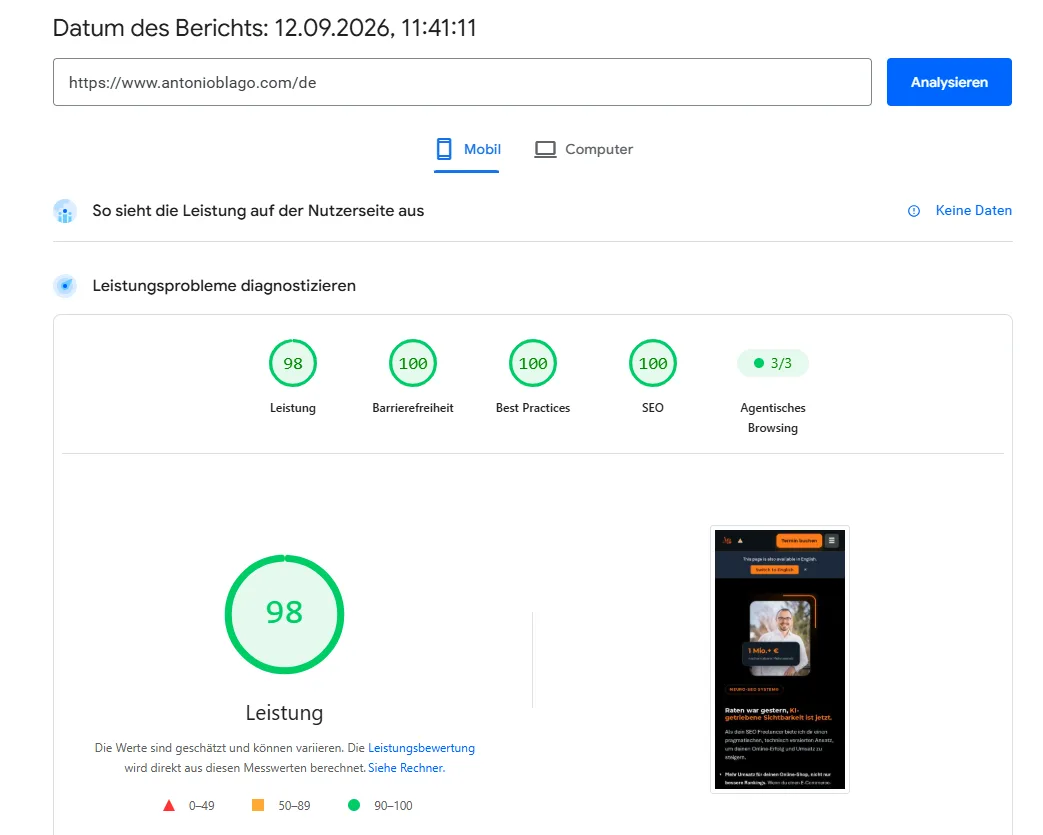
A WordPress migration from the strong into the weak domain is a question of preparation. Moving day itself was two DNS entries. The work before it was the baseline, 76 missing routes, 867 redirect rules, 92 hreflang pairs and the performance debt nobody would ever have paid in the old system. Mobile performance rose from 58 on the WordPress site to 94, plus 100 each for accessibility, best practices and SEO.[12][3]
Whether the move held its organic traffic is not decided in week one. The success criterion is 90 percent of the clicks after twelve weeks and the five top URLs within two positions.[5] I will deliver those numbers in a follow-up article, with the same baseline and the same measurement method.
Sources
- Google Search Central: Site move with URL changes. "Keep the redirects for as long as possible, generally at least 1 year." developers.google.com, accessed 11 Sep 2026.
- Google Search Central: Localized versions of your pages (hreflang). "If page X links to page Y, page Y must link back to page X ... those annotations may be ignored or not interpreted correctly." developers.google.com, accessed 11 Sep 2026.
- PageSpeed Insights, mobile, https://www.antonioblago.com/, report of 11 Sep 2026, 16:40: performance 94, accessibility 100, best practices 100, SEO 100. Own measurement. pagespeed.web.dev.
- Lighthouse analysis and action plan for the target domain, 6 Aug 2026 (Moto G Power profile, slow 4G): performance 73, accessibility 88, best practices 81, SEO 100; FCP 3.8 s, LCP 4.9 s, TBT 0 ms, CLS 0.001. Own measurement, documented in the project repository.
- Migration concept antonioblago.de to antonioblago.com, 21 Aug 2026, with the starting point from Google Search Console (365 days, as of 18 Aug 2026), backlink data from DataForSEO, URL mapping, wave plan, success criteria and baseline export (2 Sep 2026). Own analysis, documented in the project repository.
- Redirect service and crawl comparison, as of 5 Sep 2026: Screaming Frog crawl of the old site (27,056 links, 1,037 unique paths), redirect map with 867 exact rules and 3 regex rules, image mirror with 349 files, DNS cutover of the old domain. Own analysis, documented in the project repository.
- Work log 2 to 3 Sep 2026: German blog routes and 12 mirrored landing pages, German home page on the target domain, 92 German articles with English version, hosting move from PythonAnywhere to Railway with DNS cutover. Own documentation in the project repository.
- Work log 10 to 11 Sep 2026: consent analysis via browser automation (decline and accept compared), implementation of the LinkedIn feedback, podcast overview switched to the app's own database. Own documentation in the project repository.
- Chrome for Developers, Lighthouse: Eliminate render-blocking resources. "Reduce the impact of these render-blocking URLs by inlining critical resources, deferring non-critical resources, and removing anything unused." developer.chrome.com, accessed 11 Sep 2026.
- Google Search Console Help: Change of Address tool. support.google.com, accessed 11 Sep 2026.
- PageSpeed Insights, mobile, antonioblago.de (WordPress) before the move: performance 58. Own measurement; accessibility, best practices and SEO were not documented there.
- CCM19 documentation: Cookies & embeddings, section Script loader (
type="text/x-ccm-loader",data-ccm-loader-src,data-ccm-loader-group). docs.ccm19.com, accessed 11 Sep 2026. - PageSpeed Insights, mobile, https://www.antonioblago.com/de/ and https://www.antonioblago.com/, 12 Sep 2026: performance 98 and 97, accessibility, best practices and SEO 100 each; FCP 1.2 s, LCP 2.4 s, TBT 0 ms, CLS 0. Own measurement after the font reduction.
Brand Radar: where does your brand stand?
Brand and generic traffic, competitors and potential at a glance, free of charge.

About the Author: Antonio Blago
SEO Freelancer & AI Visibility Expert
I optimize SEO data-driven with Python, behavioral psychology, and my Neuro-SEO System®. On YouTube, LinkedIn, and Instagram I share hands-on tutorials, insights, and SEO strategies.