Best Claude Code Skills for Developers in 2026

AI summary
- In 30 days, Claude Code processed 26 billion tokens across 445 sessions, with 96.6% as cache reads of already-seen context.
- I use six skills from Superpowers most: brainstorming, writing-plans, subagent-driven-development, test-driven-development, systematic-debugging, and verification-before-completion.
- Context Guard, my free hook, warns Claude at 300,000 tokens and creates handoff briefings to continue work after clearing context.
- The most valuable skills grew from production failures like empty git indexes, emoji database breaks, and duplicate cron jobs, not from GitHub rankings.
Generated with AI, the details are in the article.
Table of contents
Over the last 30 days, Claude Code processed almost 26 billion tokens in my projects, spread across 445 sessions. 96.6% of them went into re-reading context Claude had already seen[18]. That number changed my choice of Claude Code skills more than any top-ten list.
Most articles on the best Claude Code skills rank by GitHub stars and install counts[12][13][14][15][16]. Hooks, token costs and production failures barely come up. Here you get the skills I actually use every day while building a SaaS platform and running more than 100 SEO projects, the measurement that shows why context is the real bottleneck, and a free hook that deals with it.
| Skill | Purpose | Source |
|---|---|---|
| Superpowers | Planning, TDD, debugging, subagents | obra/superpowers |
| code-review, security-review, simplify | Review before merging | built into Claude Code |
| skill-creator, frontend-design, webapp-testing | Own skills, UI, browser tests | anthropics/skills |
| context-mode | Keeps tool output out of the context | mksglu/context-mode |
| Context Guard (handoff) | Warns on large context, hands off across /clear | AntonioBlago/claude-context-guard |
What makes a good Claude Code skill
A skill is a SKILL.md file with a short description in its header and instructions below. At startup Claude only sees the description. It loads the rest when a task matches, or when you call the skill with /name[1]. Since slash commands were merged into skills, this is the standard way to teach Claude Code a recurring workflow.
Skill, hook, subagent, MCP: who does what
Many problems come from picking the wrong building block. The Claude Code docs separate the four clearly[2]:
- Skill: knowledge and a workflow that Claude reads and interprets. Results can vary.
- Hook: a command that always runs on a fixed event, for example before every tool call or at session start[3]. It costs no context unless it prints something.
- Subagent: a separate worker with its own context window. Only the summary comes back.
- MCP server: connects external services and data. Skills explain how Claude should use those tools.
"An instruction like 'never edit .env' in CLAUDE.md or a skill is a request, not a guarantee. A PreToolUse hook that blocks the edit is enforcement."
Claude Code Docs, Extend Claude Code[2]
In practice: rules that must never be broken belong in a hook. Workflows that need judgment belong in a skill.
Three criteria for my picks
- It prevents real failures. A skill has to catch something that has actually happened to me, not just describe good practice.
- It saves context or costs little. The name and description of every active skill sit in the context on every single turn[4]. Twenty mediocre skills cost more than five good ones.
- It triggers reliably. The description decides whether Claude loads the skill at all. The listing cuts it off after 1,536 characters[1], so the triggers belong at the front.
My measurement: where Claude Code tokens go
On every call, Claude Code sends the entire conversation so far back to the model; the prompt cache only makes that cheaper[6]. To see what that adds up to, I counted the usage in my local session transcripts: 61,415 model calls from Sep 25 to Oct 25, 2026[18].
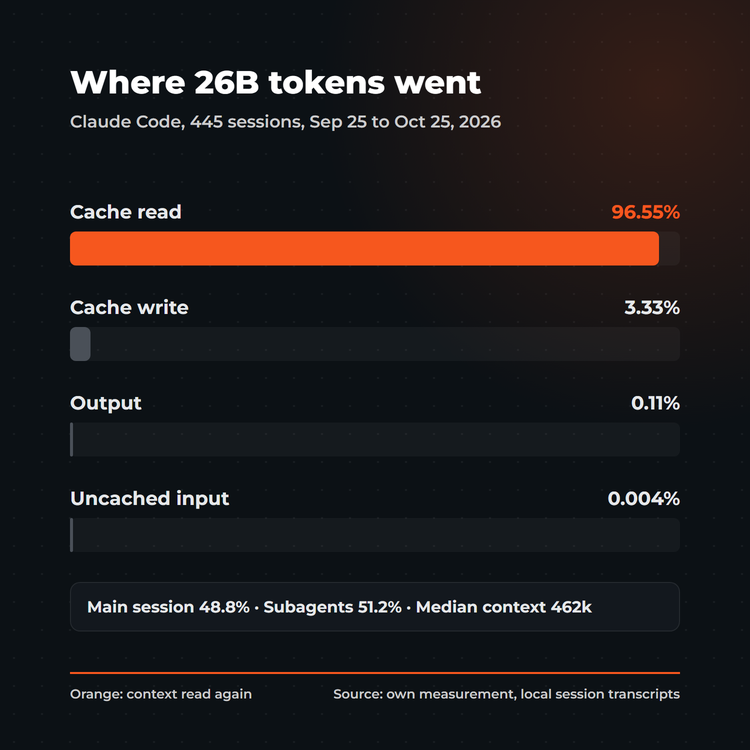
- 96.55% of all tokens were cache reads, 3.33% cache writes, only 0.11% output. Uncached input was practically zero[18].
- The context of a main-session call had a median of 462,000 tokens, with a one-million window. 68% of calls ran with more than 300,000 tokens of context, and they accounted for 88% of the context tokens read[18].
- Subagents produced 51% of all tokens. Their share of cache writes was almost three times that of the main session, because every new subagent has to build its context first[18].
A cache read costs only a fraction of a normal input token: 0.1x, and just 0.05x on Opus 5.5 and Sonnet 5.5. A cache write with a one-hour lifetime costs 2x[5]. Converting my numbers with the Opus 5.5 factors, cache writes and cache reads end up in the same order of magnitude. So both ends get expensive: huge contexts re-read on every step, and many fresh subagents writing their cache from scratch.
What that means for choosing skills: skills that keep context small do more than any skill that hands Claude a bit more knowledge.
Free SEO tools
Keyword ranking, SSR text check, sitemap audit and more, right in the browser and without signup.
The best skills for the development workflow
Superpowers: planning, testing, debugging
With about 305,000 GitHub stars, Superpowers is the best-known skill collection[9]. It gives Claude a development methodology that triggers itself. Install it with /plugin install superpowers@claude-plugins-official. These are the six skills I use most:
- brainstorming: clarifies requirements before any code is written, so Claude does not build past the goal.
- writing-plans: breaks a spec into small, checkable tasks.
- subagent-driven-development: works through the plan with one subagent per task and a review in between. Those in-between reviews repeatedly caught blockers in my projects that a single final review missed.
- test-driven-development: the failing test first, then the code.
- systematic-debugging: root cause first, then the fix. The most important skill against patchwork.
- verification-before-completion: Claude may only say "done" after it has actually run the check.
One note from the measurement above: subagent-driven-development is thorough, but every subagent writes its cache from scratch. For small changes I work inline, for multi-file plans with subagents.
Built-in skills: code-review, security-review, simplify
Some of the best skills already ship with Claude Code[1][15]:
/code-reviewreviews your changes before the merge./security-reviewlooks for vulnerabilities in the current branch./simplifychecks the change for reuse, simplification and efficiency and applies the fixes./looprepeats a task on an interval, for example to watch a deploy./batchspreads many similar changes across isolated worktrees.
My fixed routine before every push: /simplify, then /code-review, and /security-review as well whenever login, payments or user data are involved.
Official skills from Anthropic
The anthropics/skills repository holds 19 skills[8]. Four of them matter for developers:
- skill-creator: builds, tests and improves your own skills. The fastest way from "this keeps happening to me" to a skill that prevents it.
- frontend-design: gives interfaces deliberate design instead of the typical AI default look.
- webapp-testing: tests web apps in the browser with Playwright.
- mcp-builder: helps you build your own MCP servers.
Add them with /plugin marketplace add anthropics/skills. For more, awesome-claude-skills is a curated list, although its own badge says it was last updated in February 2026[11].
Skills and hooks against context costs
context-mode
context-mode keeps raw tool output out of the context window: Claude runs commands in a sandbox, indexes the result and pulls back only the relevant parts[10]. According to the maker, 315 KB of output shrink to 5.4 KB this way. I found no independent measurement. Note the license: Elastic License 2.0, so not open source in the strict sense.
Context Guard: warning and handoff briefing
context-mode keeps new output small. Against context that piles up over hours, only /clear helps, and it costs nothing[6]. The catch: after /clear, Claude no longer knows what it was working on. Automatic compaction only helps so much, since afterwards skill content is re-injected only up to 5,000 tokens per skill and 25,000 tokens in total[7].
That is why I built Context Guard and published it as a free repository[17]:
- A
UserPromptSubmithook reads the current context size from the session transcript. From 300,000 tokens on, and every further 100,000, it asks Claude to finish the current step cleanly and write a handoff briefing. - The
handoffskill writes that briefing: task, your decisions, status, running processes, open questions, pitfalls, next step. - After
/clear, aSessionStarthook loads the briefing into the new window automatically. Claude continues where it stopped, with a fraction of the context.
One Python file, standard library only, no network. If anything fails, the hook stays silent and never blocks. The 300,000 threshold is no accident: that is exactly where the calls start that make up 88% of my context[18]. With a 200k window, set it lower with an environment variable.
Get Context Guard free on GitHub
Hooks as guardrails
Hooks are not only for saving tokens. A PreToolUse hook that exits with code 2 blocks the tool call, and Claude gets the reason back[3]. That way you enforce rules that would only be requests in a skill: no writes to .env, no git push --force, no shell commands that dump raw web pages into the context. Anthropic also recommends hooks to trim long logs and test output down to the error lines before they reach Claude[6].
Build your own skills from real failures
The most valuable skills in my setup are not on GitHub. They grew out of failures that happened in production: an empty git index after git stash in parallel sessions, emojis breaking a database column, cron jobs running four times on four web workers, a railway up deploy that shipped unfinished code from the working directory. This is how a failure becomes a skill:
- Record the failure: symptom, cause, rule and a check command, one file per topic.
- Turn it into a skill: with
skill-creator[8]. Put the most important rules at the top, keepSKILL.mdunder 500 lines and move details into extra files that load only when needed[1]. - Version it: a
versionin the header of everySKILL.md, so you know which state runs in which project. - Check what you install: plugins and their hooks run with your permissions[4]. Read other people's skills before you enable them.
My own collection of these pitfalls is available as the Vibe Coding Set (in German): twelve skills for project setup, specs, safe commits, review, security, tests, migrations, deploy and launch, with 38 documented production failures and their check commands. Context Guard is included as the handoff skill. What this looks like day to day is in Agentic Engineering: 100+ SEO Projects Solo With AI and Agentic SEO Systems 2026.
Conclusion
The best Claude Code skills for developers prevent failures and keep the context small. GitHub stars say little about either. My core setup: Superpowers for the workflow, the built-in reviews before every push, skill-creator for your own skills, hooks for rules without exceptions, and Context Guard against sessions that quietly grow to hundreds of thousands of tokens. Measure your own usage before you install more skills. In my case, 96.6% of the tokens were context Claude had already read.
Sources
- Claude Code Docs: Skills. code.claude.com/docs/en/skills, accessed Oct 25, 2026
- Claude Code Docs: Extend Claude Code. code.claude.com/docs/en/features-overview, accessed Oct 25, 2026
- Claude Code Docs: Hooks. code.claude.com/docs/en/hooks, accessed Oct 25, 2026
- Claude Code Docs: Plugins. code.claude.com/docs/en/plugins, accessed Oct 25, 2026
- Anthropic API Docs: Prompt Caching. platform.claude.com/docs/en/build-with-claude/prompt-caching, accessed Oct 25, 2026
- Claude Code Docs: Manage costs. code.claude.com/docs/en/costs, accessed Oct 25, 2026
- Claude Code Docs: Explore the context window. code.claude.com/docs/en/context-window, accessed Oct 25, 2026
- anthropics/skills. github.com/anthropics/skills, accessed Oct 25, 2026
- obra/superpowers. github.com/obra/superpowers, accessed Oct 25, 2026
- mksglu/context-mode. github.com/mksglu/context-mode, accessed Oct 25, 2026
- travisvn/awesome-claude-skills. github.com/travisvn/awesome-claude-skills, accessed Oct 25, 2026
- Welcome Developer: The 10 Claude Code Skills I Actually Use at Work, Apr 8, 2026. welcomedeveloper.com
- Artificial Corner: I Tried 33 Claude Code Skills. These Are The Best, Jun 1, 2026. artificialcorner.com
- Walma: The best Claude skills in 2026, Oct 12, 2026. walma.ai
- Bozhidar Batsov: Essential Claude Code Skills and Commands, Mar 11, 2026. batsov.com
- Jonas Keil: Was sind Claude Skills?, Sep 6, 2026. jonaskeil.com
- AntonioBlago/claude-context-guard. github.com/AntonioBlago/claude-context-guard, MIT license, Oct 25, 2026
- Own measurement: usage fields of all local Claude Code session transcripts of Antonio Blago, Sep 25 to Oct 25, 2026, 445 sessions, 61,415 model calls, deduplicated by message ID

About the Author: Antonio Blago
SEO Freelancer & AI Visibility Expert
I optimize SEO data-driven with Python, behavioral psychology, and my Neuro-SEO System®. On YouTube, LinkedIn, and Instagram I share hands-on tutorials, insights, and SEO strategies.