Claude Skills in Practice: Winning the Peec AI MCP Challenge

AI summary
- Over 400 people signed up for the Peec AI MCP Challenge to build workflows in seven days, and my submission won the Reporting Automation category.
- The Peec AI Growth Loop consists of nine Claude Skills that form an agent measuring brand visibility in AI answers, analyzing gaps, and proposing exactly one next move.
- Development took six days with 11 commits and 2,631 lines of instructions across nine skills, using Claude Code to build playbooks rather than traditional programs.
- Claude Skills are reusable playbooks that teach Claude to handle specific tasks, while MCP servers provide data from external systems, and skills without MCP have no data to work with.
Generated with AI, the details are in the article.
Table of contents
More than 400 people signed up for the Peec AI MCP Challenge to build workflows on Peec AI's MCP server in seven days[1]. My submission, the "Peec AI Growth Loop", won the Reporting Automation category. The judges were Lily Ray, Ethan Smith and Malte Landwehr. The Growth Loop consists of nine Claude Skills that together form an agent: it measures a brand's visibility in AI answers, analyses the gaps and proposes exactly one next move. It saves the result so the next run starts smarter.
In this case study I explain what Claude Skills are, how they work together with the Model Context Protocol (MCP) and how I built the agent in six days. You also get the lessons for anyone who wants to build their own AI agents for SEO, GEO or reporting.
Claude Skills
9
on the Peec AI MCP, one orchestrator
Development time
6 days
11 commits, 19 to 24 April 2026
Playbook size
2,631
lines of instructions in the SKILL.md files
What are Claude Skills and how do they work?
Claude Skills are folders with instructions, scripts and resources that Claude loads dynamically to perform better on specialised tasks[6]. Anthropic describes a skill as a set of instructions, packaged as a simple folder, that teaches Claude how to handle specific tasks or workflows[7]. At the heart of each skill is a file called SKILL.md. At the top it contains a short YAML block with a name and description, followed by the actual instructions in Markdown.
The trick is in the loading: Claude first only sees the name and description of every installed skill. Only when a task matches a description does Claude load the full skill. That way a setup can hold dozens of skills without filling the context window. Skills work in Claude Code, in the Claude app and through Anthropic's API, which is why they are also called Agent Skills.
Anthropic publishes example skills in its official anthropics/skills repository on GitHub, for example for Word, Excel and PDF files or for branding according to brand guidelines[9]. In Claude Code, skills can be bundled with commands and hooks into a plugin, which makes them as easy to share as an app. A skill does not change the model itself. Claude remains a large language model, and the skill only provides the knowledge that is missing for a specific task. Many of these skills are open source and can be installed from a marketplace of plugins.
Claude Skills vs. MCP vs. prompts
These three terms often get mixed up. In my project, each one has a clear role:
| Building block | What it provides | In the Growth Loop |
|---|---|---|
| Prompt | A one-off instruction in the chat | The start command, e.g. /peec-start |
| Claude Skill | A reusable playbook: when, what, in which order | Nine skills for setup, analysis, decision, reporting and learning |
| MCP server | Access to data and tools of external systems | Peec AI for AI visibility, optionally Visibly AI and SkillMind |
The Model Context Protocol is "an open-source standard for connecting AI applications to external systems"[5]. An MCP server exposes tools that a model can call directly, which makes API integration for agentic systems much simpler. Peec AI's MCP server connects AI tools such as Claude and ChatGPT directly to Peec's visibility data: brand visibility, competitor analysis, cited sources and rankings in AI search engines[2]. A skill without MCP has no data, and an MCP server without a skill has no plan.
Which Claude Code skills matter for businesses?
Skills add the most value where teams repeat the same task under fixed rules: reports, audits, content briefs, proposals. It is workflow automation described in natural language instead of code. I now work almost entirely this way. This article was also produced with one of my own Claude Code skills, which handles research, graphics, quality gates and publishing. My platform Visibly AI offers 39 such SEO skills, from keyword research to GEO audits. I describe what this looks like day to day in Agentic SEO Systems 2026. A product of my own that was built this way is covered in my case study on my legal tech tool.
The Peec AI MCP Challenge
Peec AI measures how often brands appear in answers from ChatGPT, Perplexity, Gemini and other AI search systems, and which sources those answers cite. Its MCP server makes this data available directly in Claude. For the challenge, Peec put up a prize pool of more than USD 10,000 across three categories[3]. The USD 5,000 grand prize went to Jan-Willem Bobbink for a GEO operating system[1].
| Category | Winner | Submission |
|---|---|---|
| Reporting Automation | Antonio Blago | Peec AI Growth Loop, 9 Claude Skills on the Peec MCP |
| Content Optimization | Jan-Willem Bobbink | Semantic gap engine |
| Competitive Analysis | Florian Meier | Drift Radar |
Peec has since published the submission as the use case "Closed-Loop Growth Agent", described as: "Run your Peec projects end-to-end with a nine skill agent"[4].
How visible is your brand in ChatGPT and friends?
The AI Check shows you within minutes whether and how AI assistants mention your brand.
The Peec AI Growth Loop: 9 skills, one agent
Most reporting solutions stop at the dashboard. My approach was different: a report is only finished once it is clear what happens next. That is why the Growth Loop is built as a closed loop.
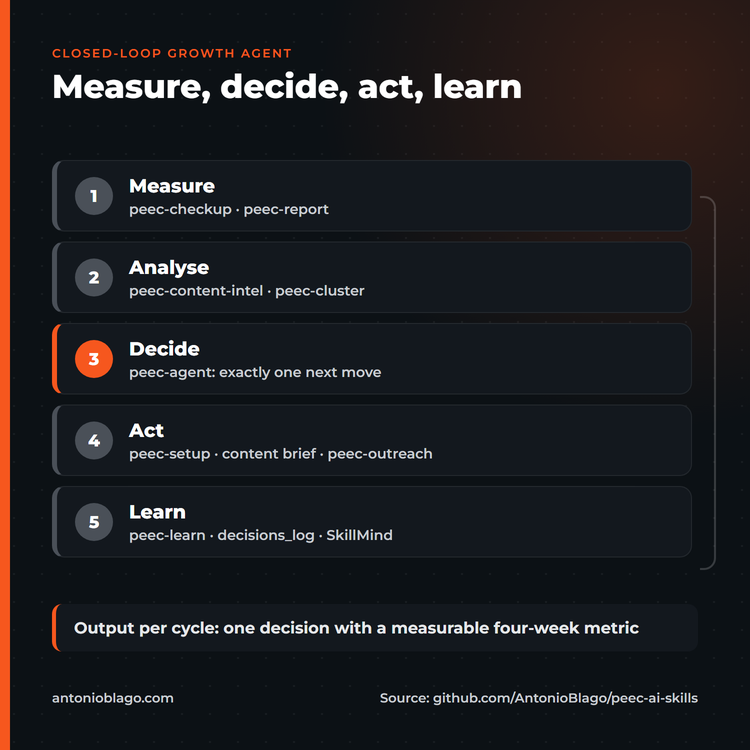
| Skill | Job | Phase |
|---|---|---|
| peec-start | Detects the project state and routes onward | Entry |
| peec-setup | Competitors from real AI chats, funnel-spread prompts, tags and topics | Act |
| peec-checkup | Weekly health check with 5 to 8 ranked improvements | Measure |
| peec-content-intel | Turns a visibility gap into a content brief | Analyse |
| peec-cluster | Groups prompts into 4 to 8 content zones | Analyse |
| peec-outreach | Ranked citation pipeline for Reddit, forums and editorial sites | Act |
| peec-report | What moved, what it cost, what we stop doing | Measure |
| peec-learn | Stores 1 to 3 patterns per run for future projects | Learn |
| peec-agent | Orchestrator: picks exactly one next move | Decide |
Why good reporting doesn't need dashboards
The orchestrator, peec-agent, always starts with a health check and then walks a fixed priority ladder. It takes the first tier whose condition is met and delivers exactly one decision with a metric that can be measured after four weeks. If there are fewer than seven days of data, it stops instead of drawing conclusions from noise.
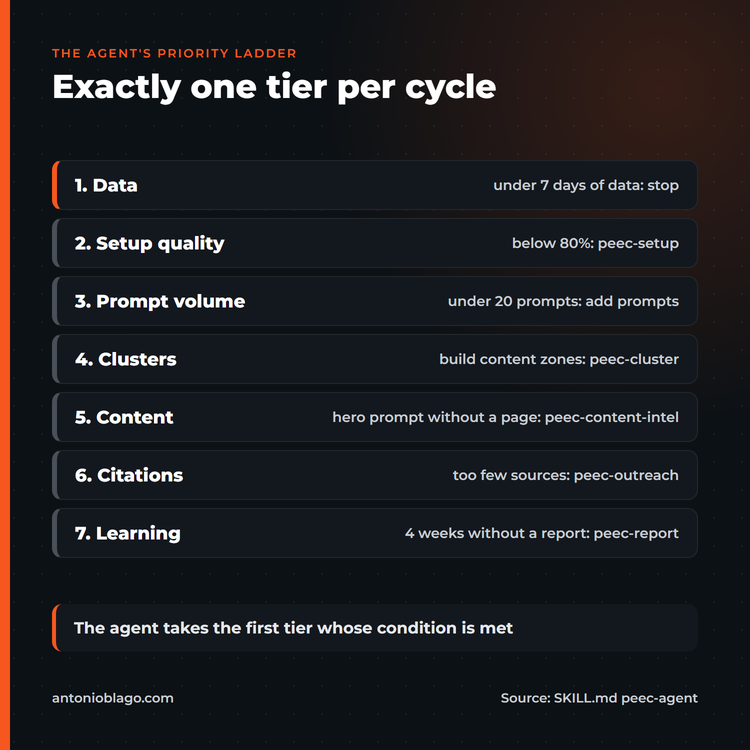
For me, that was the core of reporting automation with AI: a person reviews one well-reasoned recommendation instead of interpreting ten charts. The peec-report skill adds a stop-doing list that shows which actions had no effect.
How the agent learns: state in files
How does Claude improve over time? The model itself does not learn anything between two sessions. You have to build the memory. In the Growth Loop it lives in simple files: setup_state.json holds project, market, audience and taxonomy, and decisions_log.md records every decision with its metric. The documentation puts it simply: "the log IS the memory". Across projects, peec-learn stores patterns via SkillMind, a memory tool for Claude. A hook reports the project state automatically at the start of each session without ever blocking anything.
Which MCP tools the loop uses
The skills mainly call Peec MCP's report and recommendation tools. I counted how often each tool appears in the SKILL.md files:
Most used Peec MCP tools across the nine skills
get_brand_report: 17
get_actions: 13
create_tag: 11
get_url_report: 10
list_projects: 8
Source: own analysis of the peec-ai-skills repository[8]
Optional tools from Visibly AI add query fan-out, keyword and Search Console data. If a server is missing, the skill skips the step and says so openly. This graceful degradation mattered to me, so the loop also runs with Peec alone.
Six days of development: how the agent was built
Methodology: the numbers in this article are my own data from the repository. I analysed the commit history, line counts and tool calls myself. The commit history shows how the project evolved[8]:
- 19 April 2026: first release with two skills, extended the same day to six skills plus a query fan-out integration from Visibly AI.
- 22 April 2026: rewrite of the skills into short, clear steps, plus a learning skill with SkillMind and an install script.
- 23 April 2026: shared project state for all skills, entry and checkup skills, hooks and a 20-slide pitch deck.
- 24 April 2026: consistent peec- prefix naming and an extended schema with business type, audience and page types.
Code generation played a smaller role than you might think. Most of the work went into prompt engineering the playbooks: when does a skill stop? Which threshold applies? What happens when data is missing? Claude Code helped me write, test and rename. The domain rules come from my own work on GEO projects.
The challenge on video
I published two videos on YouTube about the challenge. The first presents all nine skills and my setup in English; the second, in German, shows me building a skill live with Claude Code.
What I learned about AI agents and MCP development
- Skills are playbooks, not programs. A good SKILL.md reads like onboarding notes for a new colleague: goal, sequence, stop rules, examples.
- One decision beats ten recommendations. The priority ladder forces the agent to commit to something you can check after four weeks.
- State belongs in files. What isn't saved doesn't exist in the next session. JSON and Markdown are enough; you don't need a database.
- Stop rules are quality. An agent that halts when data is thin is more valuable than one that always has an answer.
- MCP makes data swappable. Because the skills only know tool names, you can add more servers without rewriting the logic.
Measuring AI visibility is a topic of its own. My approach is laid out in my study on how LLMs rank brands and in the overview of AI SEO and GEO.
Limits: what Claude Skills can't do
Claude Skills have clear limits. They are only as good as the data that comes in via MCP. They can go wrong when instructions are ambiguous, and they do not replace expert judgement on budget or positioning. Every run also costs tokens and Peec data calls. A person should review every decision before it is implemented. With several client projects, learned patterns must never carry confidential data from one project to the next.
How to create your own Claude Skills
Creating your own skill takes less than an hour. Here is how to get started:
- Pick a recurring task: for example the weekly report, a content brief or a proposal template.
- Create a folder with a SKILL.md: a name and a precise description of when Claude should use the skill at the top. The description decides whether the skill gets loaded.
- Write the instructions as steps: goal, sequence, stop rules and an example of the desired output.
- Add scripts or templates: anything that should always be identical belongs in a file, not in the text.
- Test and refine: run the skill on real tasks and turn every deviation into a rule.
If you are a beginner, the fastest way in is to copy an example skill from anthropics/skills and adapt it step by step. Good prompt engineering here mostly means clear conditions instead of vague wishes.
How to use the Growth Loop yourself
The project is open source under the MIT licence on GitHub[8]. You need Claude Code, a Peec AI account with the MCP server connected, and the install script from the repository, which links the skills into Claude's skills folder. After that, the /peec-start command is enough: the agent detects whether it should set up a new project or take over an existing one and guides you through the next steps. Visibly AI and SkillMind are optional and extend the analysis and memory.
I also teach the same approach in my workshops on AI visibility, as described in the GSO seminar case study.
Working with Claude Code: what developers need
Claude Code is an agentic coding tool that runs in the terminal. Unlike classic autocomplete in the IDE, as GitHub Copilot started out, it reads the whole project, plans several steps, calls tools and edits files itself. AI editors such as Cursor or Windsurf sit in between. For building the Growth Loop, the agentic approach mattered most, because Claude Code can call MCP tools and load skills in the same session. That is tool use in practice: the large language model decides which tool to call and with which parameters.
Which skills do developers need for Claude Code?
- Clear task framing: the better you describe the goal, constraints and done criteria, the better the result.
- Reading diffs: you review every change like a pull request from a colleague.
- Testing: you validate generated code with tests, linting and CI, not by trusting the explanation.
- Basic git and terminal knowledge: that is the background that helps beginners get started fastest.
Claude Code works with all common programming languages. In my software development I mainly use it for Python, SQL and TypeScript with React. Experienced developers integrate it into their existing workflow via skills, hooks and a plugin architecture that shares configuration across a team. Beginners benefit too, but they need to learn to question the output.
As a junior developer, build the foundational skills first: version control, reading error messages and writing a simple test. As a senior engineer, you get the most out of Claude Code by encoding your existing experience into skills, for example your review checklist or your team's conventions. The fastest way to develop proficiency is a small real project: one feature, one skill, one review loop. That is exactly how the Growth Loop grew from two to nine skills in six days.
Limitations of Claude Code that still need human skill
Architecture decisions, security reviews, performance optimisation under real load and anything involving business trade-offs still need an experienced person. Code generation is fast, but responsibility for what goes live stays with you. In the Growth Loop, that is exactly why every decision is logged and reviewed.
FAQ: Claude, Claude Code and Agent Skills
Can Claude write code?
Yes. With Claude Code, Claude works directly in the terminal and the project folder: reading, writing, testing and changing code. That is how I run the Growth Loop and this blog. Claude Skills and MCP servers are particularly easy to plug into Claude Code.
Claude or ChatGPT: which AI has the better skills?
Benchmarks change with every model release, so a blanket answer isn't very useful. What matters for my work is Claude Code, skills and broad MCP support. MCP is an open standard, though: ChatGPT can also use the Peec MCP server[2]. The data is not tied to one model, while playbooks in the SKILL.md format are more specific to Claude.
Does Claude get better at its skills over time?
The model does not learn automatically from your sessions. Improvements come from refining the instructions in the skill or, as in the Growth Loop, from saving results in files that the next run reads again.
Conclusion
Winning the Reporting Automation category confirms an idea for me: good automation answers the question "What do we do next?". Prettier charts do not. Claude Skills provide the playbook, Peec AI's MCP server the data, and simple files the memory. With that combination you can build agents in a few days that take real work off your plate, as long as a person reviews the decisions.
Thank you to the Peec AI team and to the judges, Lily Ray, Ethan Smith and Malte Landwehr. There will surely be another challenge, and I'm curious to see what the community builds next.
Sources
- Peec AI: LinkedIn post "The Peec MCP Challenge is a wrap" with winners and judges, 2026. Details as stated in the post.
- Peec AI: Peec AI MCP. Link, accessed 30 September 2026.
- Peec AI: MCP Challenge. Link, accessed 30 September 2026.
- Peec AI: Closed-Loop Growth Agent, MCP use case, 29 September 2026. Link, accessed 30 September 2026.
- Model Context Protocol: Introduction. Link, accessed 30 September 2026.
- Claude Help Center: What are Skills?, 22 September 2026. Link (German), accessed 30 September 2026.
- Anthropic: The Complete Guide to Building Skills for Claude. PDF, accessed 30 September 2026.
- Antonio Blago: peec-ai-skills, GitHub repository, MIT licence, commits from 19 to 24 April 2026. Link, accessed 30 September 2026.
- Anthropic: anthropics/skills, GitHub repository with example skills. Link, accessed 30 September 2026.
Visibly AI: your SEO copilot
Projects, rankings, Search Console data and a copilot that runs the analysis for you. Start for free.

About the Author: Antonio Blago
SEO Freelancer & AI Visibility Expert
I optimize SEO data-driven with Python, behavioral psychology, and my Neuro-SEO System®. On YouTube, LinkedIn, and Instagram I share hands-on tutorials, insights, and SEO strategies.