What Is Claude Code? The Complete Guide for 2026

AI summary
- Claude Code is an AI agent by Anthropic running in terminal, VS Code, desktop app or browser that reads, edits files and executes commands within granted permissions.
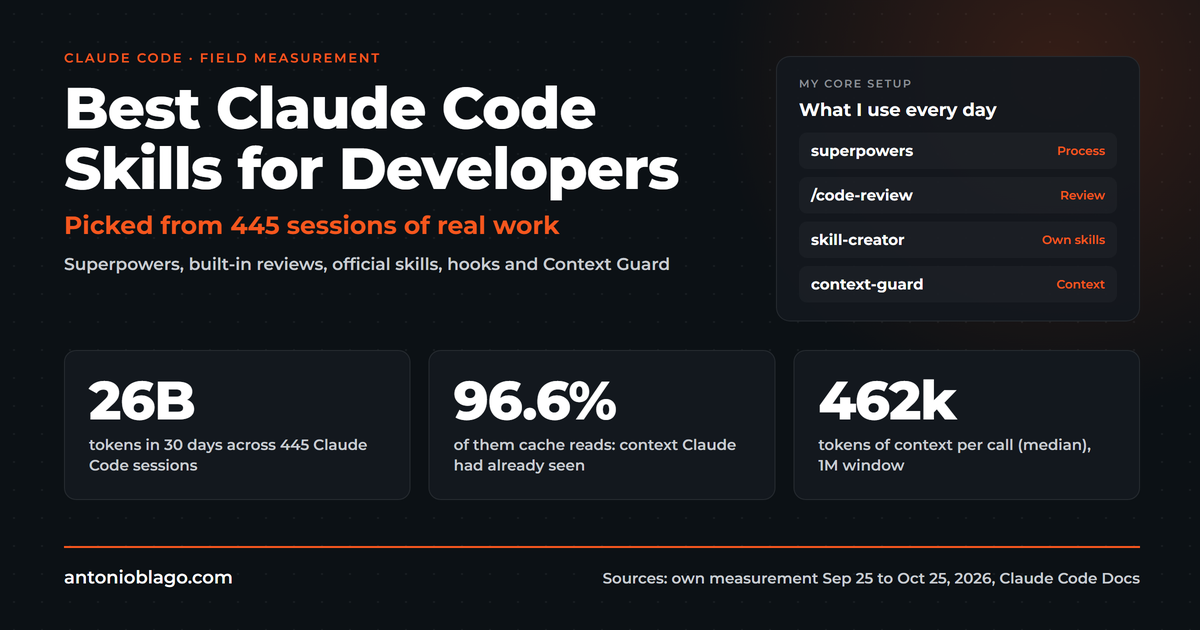
- The guide rests on the author's own measurement: 26 billion tokens across 445 sessions in 30 days, 96.6 percent of them served from the prompt cache.
- Claude Code costs $20 monthly for the Pro plan, Max plans start at $100 monthly; for API use the docs quote an enterprise average of about $13 per developer per active day.
- The five-level setup structure includes role in global CLAUDE.md, recurring tasks in skills folder, current projects in project folders, knowledge in auto memory, and tools via scripts and MCP servers.
Generated with AI, the details are in the article.
Table of contents
Claude Code series, all parts:
- What is Claude Code? The complete guide (this article)
- How to set up Claude Code: a guide for beginners
- Best Claude Code skills for developers
- AI hallucinations: what DELEGATE-52 shows for businesses
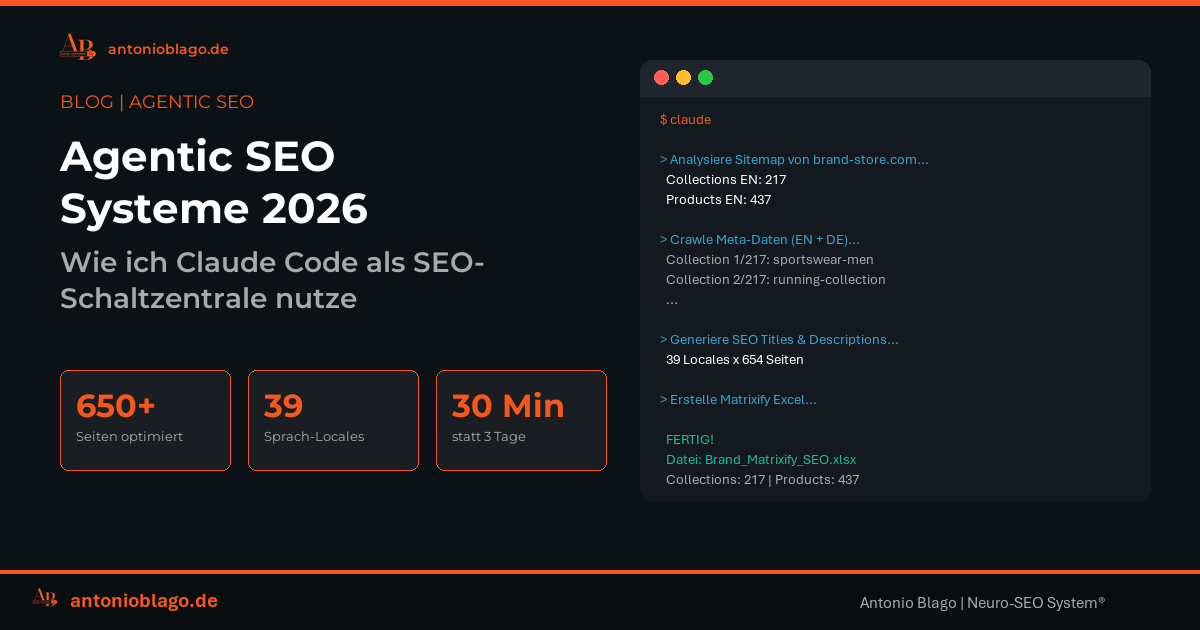
- Agentic SEO systems 2026: Claude Code as an SEO control center
- Agentic engineering: 100+ SEO projects solo with AI
- Claude skills in practice: winning the Peec AI MCP Challenge
- Build an online shop with Claude Code: Happy Coffee
- Be Ahead #1: prompt sets, chat charts, Claude routines
- How LLMs rank brands: a statistical study
Claude Code is an AI agent by Anthropic that runs in your terminal, in VS Code, in the desktop app or in the browser, reads and edits your files and executes commands within the permissions you grant[1]. Developers rely on it to write software. I work with it every day as the control center for SEO analyses, offers, blog articles, bookkeeping and the maintenance of my software Visibly AI, and most of that has little to do with code.
This guide is the map to everything I have written about it. It explains what Claude Code is, what it costs, how to set it up, which building blocks exist (CLAUDE.md, skills, subagents, hooks, MCP, plan mode) and what has proven itself in practice. The basis is 26 billion tokens from 445 of my own sessions in 30 days[31]. Every topic has its own deeper article, and the series of articles keeps growing.
A look at the search queries shows why a map is needed. In the United States, "claude code pricing" gets around 27,100 searches a month, "codex vs claude code" 14,800, "what is claude code" and "claude code skills" 12,100 each, "claude code vs cursor" 6,600 and "claude code hooks" 3,600[32]. Setup is just one question among many.
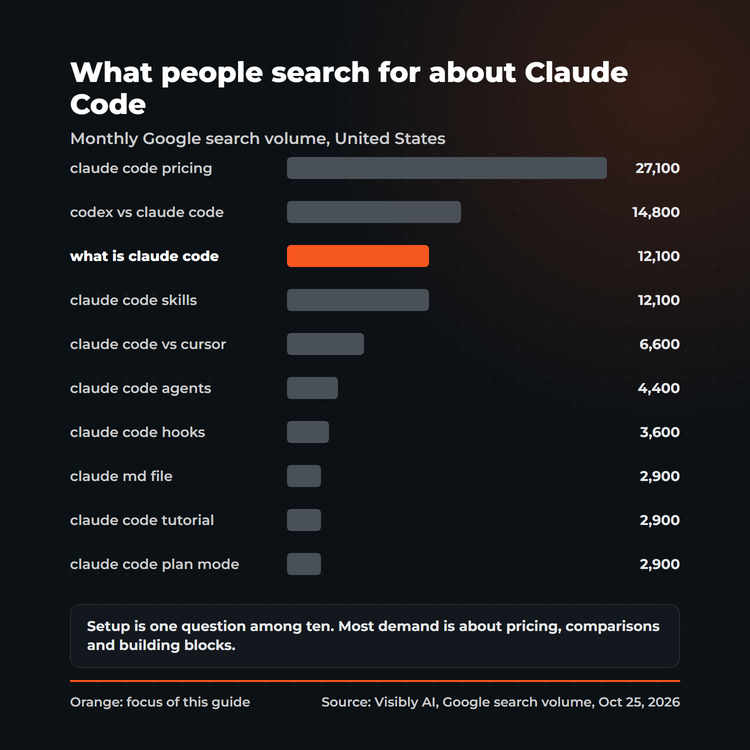
All parts of the series are listed in the box at the top and again at the end of this guide. Further parts on pricing, Codex compared, privacy, other models and MCP will follow.
What is Claude Code?
Put simply, Claude Code belongs to the developer tools that bring artificial intelligence into your working folder. Under the hood it runs on Claude, a large language model built with natural language processing, and the official docs describe it as an AI-powered coding assistant that understands your entire codebase and works across multiple files and tools to build features, fix bugs and automate development tasks[1]:
"Claude Code is an AI-powered coding assistant that helps you build features, fix bugs, and automate development tasks. It understands your entire codebase and can work across multiple files and tools to get things done."
Anthropic, Claude Code Docs[1]
The decisive difference to a chat in the browser: the agent sits in a folder on your machine. It reads what is there, writes new files, runs programs and pulls data from your programs through connections. You give it a goal, the agent plans the steps and works through them, and you decide through permissions how far it may go.
The agent follows the Unix philosophy and fits into scripts and pipelines. One example from the docs: pipe the last 200 lines of a log into claude -p and have it report anomalies[1]. Add scheduled tasks in the cloud or on your machine, such as a morning review of open pull requests, and remote control of a running session from your phone[1]. For non-developers this means: anything that involves files, texts, spreadsheets and recurring routines can be handled by the agent, from the offer to the meeting follow-up to the monthly report.
How Claude Code works: the main features
What is Claude Code used for? At its core for five features that work together in every session[1][17]:
- Read and understand: the agent reads files, maps the structure of a codebase or a project folder and answers questions about it, in any common programming language.
- Create and change: code generation, refactoring of existing code, new files, texts and spreadsheets. You can review every change in plan mode first.
- Run: commands, tests and scripts execute directly in the terminal, and the results feed the next step.
- Review: code review of its own changes, commits in version control with Git, pull requests on GitHub.
- Connect: through MCP the agent reaches external services and data, through skills and hooks it learns your routines.
Developers apply these features to software development, everyone else to file work of any kind. The limits: the agent is only as good as the context you give it, every session costs tokens, and it only runs what your permissions allow[16][9].
Where Claude Code runs: terminal, VS Code, desktop app and web
The agent is available on five surfaces: as a command line in the terminal, as an extension for VS Code, as a plugin for JetBrains IDEs (integrated development environments), as a desktop app for macOS, Windows and Linux, and as a web version in the browser, the Claude app[1]. The desktop app works without a command line: you pick a folder and start[2]. What matters for your decision: all surfaces run on the same engine. Your CLAUDE.md files, settings and MCP servers apply everywhere[1]. Sessions can be handed from one surface to another, for example from the web into the terminal or from the terminal into the desktop app[1].
What Claude Code costs
The agent is included in the paid Claude plans. The free claude.ai plan does not include it[2]. Alternatively you pay per usage through a Console account[1].
| Access | Price | For whom |
|---|---|---|
| Pro | $20 per month, $17 with annual billing[11] | getting started, occasional use |
| Max | from $100 per month, 5x or 20x the usage of Pro[11] | daily work with long sessions |
| Team and Enterprise | per seat, prices at Anthropic[11] | enterprise AI with administration and commercial data terms |
| API (Console) | per token used through the Claude API[11] | automation, scripts, custom agents |
Which of these plans fits depends on how many hours a day the agent works for you: the Pro plan covers occasional use, the Max plans exist for heavy daily work, and the Team and Enterprise plans add administration and commercial data terms[11].
What does API usage cost? The docs quote an enterprise average of around $13 per developer per active day and $150 to $250 per developer per month. For 90 percent of users, costs stay below $30 per active day[10]. With /cost you see the running cost of each session and the share of input tokens served from the prompt cache[10]. That cache is the biggest lever: in my measurement, 96.6 percent of all tokens came from the cache[31]. How to keep costs under control gets its own part of the series.
Claude Code vs. ChatGPT, Cursor, Codex and Gemini CLI
The most common comparison query is "codex vs claude code" with 14,800 searches a month in the United States and 1,900 in Germany[32]. Here is the short version, three sentences per candidate:
- ChatGPT and the Claude app in the browser are chats. Both rest on a large language model, that is machine learning and natural language processing. You get answers, texts and code back as text. An agent works directly in your folders and tools[1].
- Cursor is a code editor with built-in AI. The agent is no editor: you work with it in the terminal, in the desktop app or as an extension in VS Code and JetBrains, so you keep your familiar environment[1].
- Codex by OpenAI is an open-source coding agent for the terminal[22], Gemini CLI by Google brings Gemini into the terminal as an open-source agent[23], and GitHub Copilot CLI does the same with the Copilot coding agent[24]. All three follow the same principle. The differences lie in the model, the configuration and the ecosystem of skills, hooks, MCP and plugins. The agent also reads a repository's AGENTS.md files in place of CLAUDE.md if a project already uses them[3].
The detailed comparison of Codex, Gemini CLI and Copilot follows as its own part of the series.
How to set up Claude Code: installation and a five-level structure
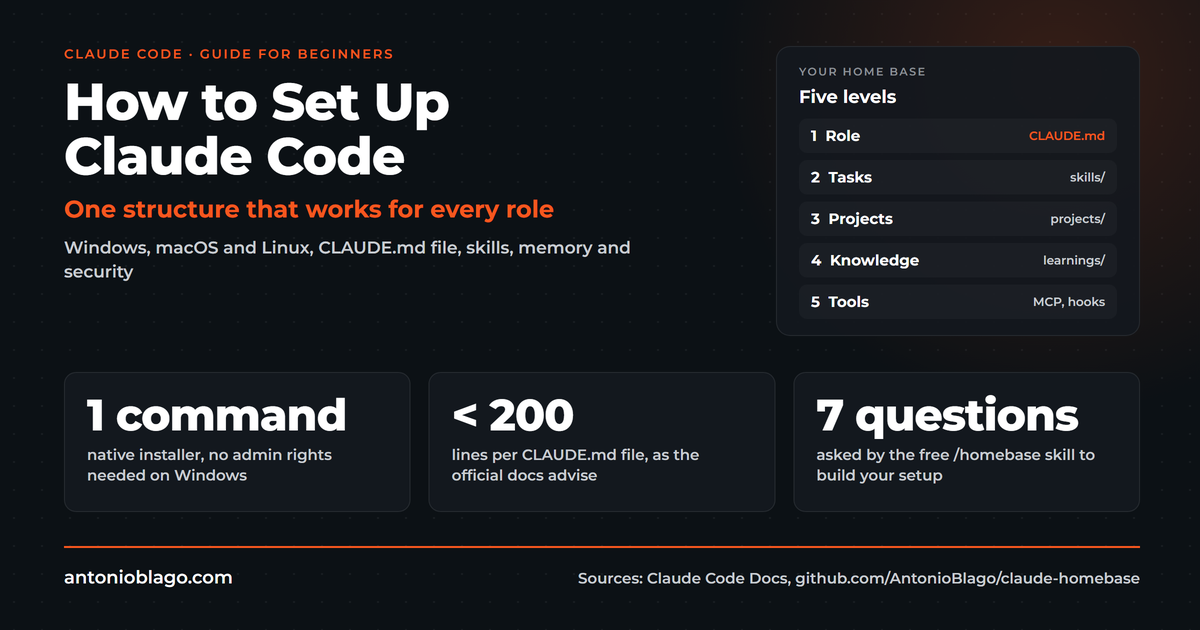
The full walkthrough with every command, the Windows pitfalls and a free template is in How to set up Claude Code. Here is the short version.
First steps: installation in one command
The native installer needs no Node.js and no administrator rights, and it keeps itself updated[2]:
# macOS, Linux, WSL
curl -fsSL https://claude.ai/install.sh | bash

# Windows PowerShell
irm https://claude.ai/install.ps1 | iex
Then open a new terminal window, check with claude --version, change into your project folder and start claude. On first start you log in through the browser. You need a paid plan or a Console account[2].
The CLAUDE.md file: the most important file
The CLAUDE.md file is how you tell the agent who you are and how you work. There are three levels: ~/.claude/CLAUDE.md applies to all projects, ./CLAUDE.md in the project folder applies to that project, and CLAUDE.local.md stays private on your machine. The agent merges the files from the working folder upwards[3]. With /init you generate a first version for a project[3].
Two rules from the docs have held up in my work. First: keep every file under 200 lines[3]. Second: ask of every line "Would removing this line cause mistakes?" If the answer is no, it belongs in a skill or in your learnings[16]. And one limitation many overlook: the CLAUDE.md file is context, it enforces nothing. Whatever must always apply belongs in a hook[3].
Role, tasks, projects, knowledge, tools
My folder and knowledge structure follows a chain of five levels that fits every role, with or without code:
| Level | Question | Where it lives |
|---|---|---|
| Role | Who are you, who do you work for? | ~/.claude/CLAUDE.md |
| Tasks | What do you do the same way every week? | ~/.claude/skills/ |
| Projects | What are you working on right now? | one folder per client or venture with CLAUDE.md and a status file |
| Knowledge | What should the agent remember? | auto memory, learnings, handoffs |
| Tools | Which programs should it operate? | scripts, MCP servers, hooks |
If you do not want to build this by hand, take Claude Homebase, a template under the MIT license. The /homebase skill asks seven questions about role, goals, tasks, infrastructure, start folder, starter path and brand, saves the answers and builds the global CLAUDE.md, the project structure, first skills, the learnings folder and security settings with a blocked .env file[25].
The building blocks: skills, subagents, hooks, MCP and plan mode
Once the basic structure stands, the building blocks follow, and they are what people search for most: "claude code skills" (12,100 searches in the United States), "claude code agents", "claude code hooks", "claude code mcp" and "claude code plan mode"[32]. Here is each block in brief, with a pointer to the deep dive.
Claude Code skills
A skill is a folder with a SKILL.md file that holds instructions for a recurring task. The agent uses the skill on its own when the task fits, or you invoke it with /skill-name. Only the description stays in context permanently; the content loads on demand[4]. The former custom commands have been merged into skills, and skills follow an open standard that also works in other AI tools[4]. Some skills ship with the agent, such as /code-review, /debug and /verify[4].
In my setup every recurring routine is a skill, from the offer to the meeting follow-up to the blog article, more than 80 in total[33]. Which skills work best for developers and how I measured them is in Best Claude Code skills for developers.
Claude Code subagents and agents
A subagent is a helper with its own context window, its own system prompt, its own tool access and its own permissions. The main agent delegates to it as soon as a task matches its description and gets only the result back[5]. That protects the main context, limits tools and lets you route simple work to a fast, low-cost model like Haiku[5]. Built-in subagents already exist; you define your own when you keep starting the same helper with the same instructions. When the descriptions of all your subagents together exceed 15,000 tokens, you get a warning at startup[5].
My rule, and it works best this way: Haiku for mechanical bulk work, Sonnet for scoped research, Opus for planning and debugging when the cause is unknown[33]. For many independent sessions in parallel there are background agents and agent teams that Claude starts and supervises itself[5].
Claude Code hooks
Hooks are shell commands that run at fixed moments: before a tool call, at session start, on every prompt or when Claude finishes. They live in settings.json and run deterministically, regardless of whether the model happens to think of them[6]. This is the place for everything that must always apply: protection against dangerous commands, reminders, context guards.
My example is Context Guard: a hook that warns when the context gets expensive, and a skill that writes a handoff briefing which the next session loads automatically after /clear[26].
Claude Code MCP
Through the Model Context Protocol (MCP) you connect the agent to external services and data sources. A server is added with one command, for example claude mcp add --transport http <name> <url>, either for you only, for one project (.mcp.json) or for all your projects[7]. The docs advise connecting only trusted servers, because content coming from an MCP server can inject instructions[7].
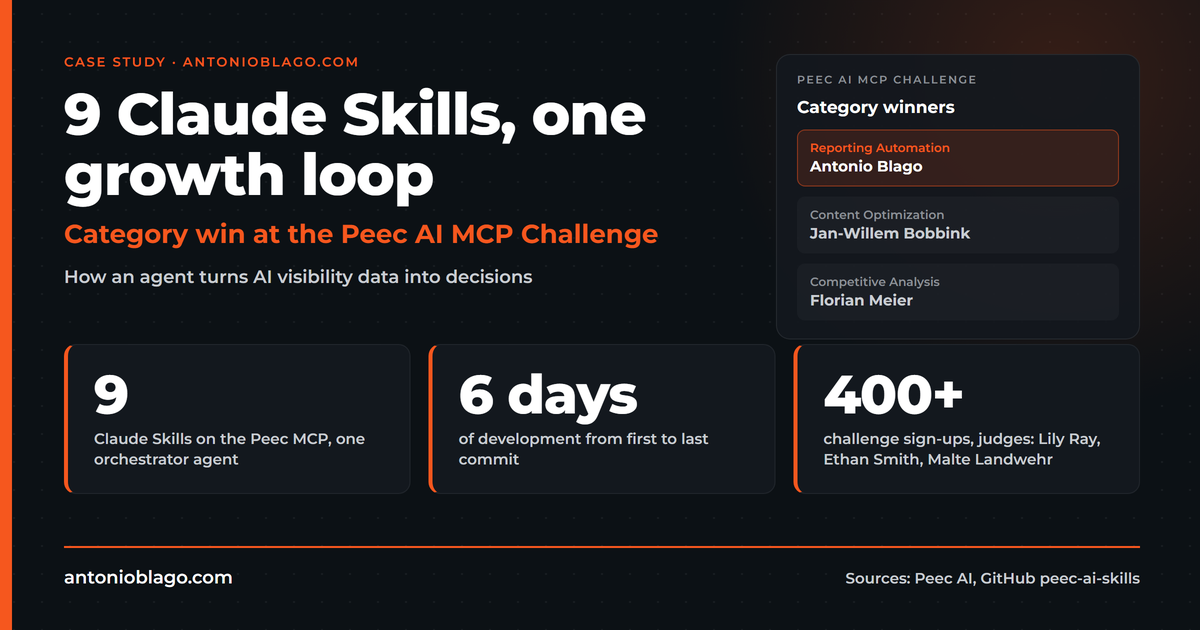
This is how SEO data reaches my agent: the Visibly AI MCP server provides 51 tools for keywords, traffic, backlinks, on-page, SERP and project data and writes content back[29]. How skills and an MCP server together win a challenge is shown in the Peec AI case study. A dedicated part of the series on MCP follows.
Plan mode, checkpoints and sessions
Plan mode is the mode for changes you want to see first. Claude reads files and proposes a plan but changes nothing until you approve it. You switch with Shift+Tab until the status bar shows plan mode[17]. The docs recommend it for anything that touches more than a few lines[16].
Checkpoints capture the state of your files before every prompt that starts a turn, independent of version control with Git. The agent keeps the snapshots of the 100 most recent checkpoints per session, and you rewind when something goes wrong[18]. Sessions continue with claude --continue or claude --resume, even across several days[17]. You pick the model with /model through aliases such as opus, sonnet and haiku. The alias opusplan plans with Opus and executes with Sonnet[15].
Pull requests, code review, plugins and the Agent SDK
Three blocks for advanced users, above all for teams that work with pull requests. Plugins bundle skills, agents, hooks and MCP servers into one package that you install from a marketplace, starting with /plugin[19]. GitHub Actions bring the agent into your repository: mention @claude in a pull request or issue and Claude analyzes, changes and commits; /install-github-app handles the setup, and automatic code review on every pull request comes on top[20]. The Agent SDK gives you the same tools, agent loop and context management as the agent itself, programmable in Python and TypeScript, for your own agents inside your applications[21].
Claude Code best practices from 26 billion tokens
Between September 25 and October 25, 2026, 26 billion tokens ran through the agent on my machine, spread over 445 sessions, 96.6 percent of them as cache reads[31]. Five best practices turned out to matter most:
- Context is the scarcest resource. The context window fills with every file and every result. Run
/clearbetween tasks and split long projects with handoffs[16]. - The CLAUDE.md file stays short. Rules whose absence causes mistakes, nothing else[16].
- Every correction becomes a rule. Learnings in topic files that are read before matching work, so the same mistake does not happen twice[33].
- Plan mode works best before big changes and any refactoring. Read the plan first, then approve[17].
- Whatever must always apply becomes a hook. Everything else becomes a skill[3][6].
Methodology of the measurement
Methodology: the numbers come from an original measurement of my own, not from a survey: a script reads the session logs that the agent stores locally as JSONL files and sums input, output and cache tokens per session. Period September 25 to October 25, 2026, 445 sessions, no extrapolation. Script and evaluation are in the skills article[31].
Keep context small and move knowledge out
My setup consists of more than 80 skills, learnings in eight topic files plus an index, handoff briefings per project and one client folder per engagement with a status file as the entry point[33]. Two hooks always run: Context Guard and a reminder for time tracking[33]. The reason for the discipline is measurable: a Microsoft Research study with 52 tasks shows that even the best models lose around 25 percent of content fidelity in multi-step pipelines, and the loss grows with longer context and more intermediate steps[34]. What that means for building your own pipelines is in AI hallucinations: what DELEGATE-52 shows. The delegate-audit repo lints skills against the four rules from the study[28].
Security and privacy
Every session runs in a permission mode. In auto mode, a separate classifier model reviews every action and blocks what it judges unsafe. In manual mode, the agent starts read-only and asks before every edit and command, to be allowed once or from then on[9]. On top come a sandbox for shell commands with filesystem and network isolation and the working directory boundary[9]. In settings.json you define with permissions what is allowed, asked or denied, for example Read(./.env) set to deny[8].
On privacy there are two worlds. For consumer plans (Free, Pro, Max), a setting in your account decides whether your data may be used for model training, and that applies to the agent from these accounts too. For commercial use (Team, Enterprise, API, third-party platforms), Anthropic does not train on code or prompts without an explicit opt-in[12]. Transcripts you submit via /feedback are retained for five years[12]. If you process client data, check the plan and the setting first.
Claude models, other providers and gateways
Besides Anthropic, the agent runs through Amazon Bedrock, Google Cloud (formerly Vertex AI) and Microsoft Foundry, which is how enterprise AI rollouts usually run, optionally behind a gateway with sign-in through your company's identity provider[13]. A gateway bundles credentials, usage, budgets and audit logs in one place[14]. The docs name one limit explicitly: routing the agent to models from other providers through a gateway is not supported[14]. The demand exists anyway: "claude code ollama" is searched 590 times a month in the United States and 390 times in Germany[32]. What works and what does not gets its own part of the series.
Related articles: Claude Code in practice for SEO, content, shops and AI visibility
Theory is one thing. These articles show how the agent works in real projects:
- Agentic SEO systems 2026: how I run Claude Code as an SEO control center, from keyword analysis to reporting.
- Agentic engineering: 100+ SEO projects solo with AI: Fabian Rossbacher builds more than 100 projects without a dev team, a podcast conversation (also on YouTube) with context.
- Build an online shop with Claude Code: Christian Häfner rebuilt the Happy Coffee shop with Claude Code, and why better technology alone brings no revenue, from the podcast (also on YouTube).
- Claude skills in practice: Peec AI: nine skills on an MCP server that won a challenge category, with architecture and agent logic.
- Be Ahead #1: prompt sets, charts with a source rule and Claude routines to rebuild.
- How LLMs rank brands: a statistical study of AI visibility whose evaluation is available as a framework on GitHub.
For developers who build software with the agent, my collected production pitfalls from code generation with agents are available as the Vibe Coding Set (German), including a skill that sets up a new project along the same pattern. All skill sets are at antonioblago.com/de/skills.
Open-source repos and starter paths
All developer tools and templates I have published for it are open source on GitHub. Depending on your role, a different starter path fits:
| Repo | For whom | What it does |
|---|---|---|
| claude-homebase | everyone, start here | interview skill that builds CLAUDE.md, folder structure, skills and learnings[25] |
| claude-code-seo-starter | SEO freelancers, agencies | client workflow status quo, potential, offer, PDF[27] |
| visiblyai-mcp-server | SEO, content | 51 SEO tools via MCP in Claude Code, Cursor and others[29] |
| claude-context-guard | developers, heavy users | hook warns about expensive context, skill for the handoff[26] |
| delegate-audit | skill builders | lints skills against the four DELEGATE-52 rules[28] |
| skillmind | long-term memory | memory layer with 31 MCP tools, learns from videos[30] |
| peec-ai-skills | AI visibility | skills for Peec AI, project setup and content gaps[30] |
| llm-visibility-framework | AI visibility, research | statistical framework for brand visibility across LLMs[30] |
| content-automation | content | YouTube and podcast into blog articles[30] |
| anycms, visibly-ai-cms-connector | content, developers | connect a CMS to an AI content pipeline, signed webhooks[30] |
Frequently asked questions
What is Claude Code in one sentence?
Claude Code is an AI agent by Anthropic that brings artificial intelligence into your terminal, your IDE or the desktop app, understands your files and programs and completes tasks across multiple steps on its own, within the permissions you give it[1].
Is Claude Code free?
No. It needs one of the paid plans (Pro from $20 per month, Max from $100, Team or Enterprise) or a Console account billed per usage through the Claude API. The free claude.ai plan does not include it[2][11].
Is Claude Code good for beginners without coding skills?
Yes. For the setup it is enough to paste one command, and the desktop app needs no command line at all[1]. The structure of role, tasks, projects, knowledge and tools is made for people who work with texts, clients and files. Claude Homebase builds it for you through an interview[25].
Is my data used for model training?
It depends on the account. For Free, Pro and Max, a setting in your account decides whether data may be used for model training. For Team, Enterprise and API, Anthropic does not train on code or prompts without an explicit opt-in[12]. Check the setting before you process client data.
Which models can I use with Claude Code?
The Claude models Opus, Sonnet and Haiku, optionally with a large context window, switchable with /model[15]. Access runs through Anthropic, Amazon Bedrock, Google Cloud or Microsoft Foundry[13]. Models from other providers through a gateway are officially not supported[14].
Who created Claude Code and when was it released?
Claude Code was created by Anthropic, the company behind the Claude models. It was introduced on February 24, 2025 as a limited research preview alongside the Claude 3.7 Sonnet model[35]. Since May 22, 2025 it has been generally available, in the terminal, in IDEs and with an SDK for background use[36].
Is Claude Code worth it for freelancers and small teams?
In my experience yes, as soon as tasks repeat. A freelancer rarely has a dev team but has plenty of similar routines: offers, analyses, reports, articles. Those are exactly what you capture as skills and connect to project folders[33]. Costs stay manageable when you keep the context small and let the cache do its work[10][31].
What are the limits of Claude Code?
Three limits come up most often. The context window is finite, long sessions get more expensive and less precise, hence /clear and handoffs[16]. The agent only runs what your permissions allow and, in auto mode, blocks what it judges unsafe[9]. And it works with Claude models; models from other providers are officially not supported[14].
Can a non-technical founder use Claude Code to build a product?
Yes, with two guardrails. Start with plan mode so you read every proposed change before it touches a file, and keep checkpoints on so you can rewind[17][18]. Christian Häfner rebuilt the Happy Coffee shop this way; his story in this series also shows that better technology alone brings no revenue. Claude Homebase sets up the structure for you through an interview[25].
Claude Code or Codex: which should I pick?
Both are coding agents for the terminal; Codex is open source and comes from OpenAI[22]. The decision depends on the model you prefer, your subscription and the ecosystem you need: skills, hooks, MCP and plugins on one side, the integration with ChatGPT on the other. The detailed comparison follows in this series.
What is plan mode?
A mode in which Claude reads files and proposes a plan but changes nothing until you agree. You turn it on with Shift+Tab[17]. It is the safest way to handle larger changes.
Conclusion and next steps
Claude Code is an agent that works inside your folders, and that is exactly what sets it apart from a chat. The best way to start is this order: install, write a short global CLAUDE.md with your role, create a project folder, capture your first recurring task as a skill, block the .env file. From there the setup grows with every correction you turn into a rule. Subagents, hooks, MCP and plan mode join as soon as you need them. This guide is updated with every new part of the series.
All parts of the Claude Code series:
- What is Claude Code? The complete guide (this article)
- How to set up Claude Code: a guide for beginners
- Best Claude Code skills for developers
- AI hallucinations: what DELEGATE-52 shows for businesses
- Agentic SEO systems 2026: Claude Code as an SEO control center
- Agentic engineering: 100+ SEO projects solo with AI
- Claude skills in practice: winning the Peec AI MCP Challenge
- Build an online shop with Claude Code: Happy Coffee
- Be Ahead #1: prompt sets, chat charts, Claude routines
- How LLMs rank brands: a statistical study
Sources
- Official documentation: Claude Code overview, retrieved October 25, 2026
- Official documentation: Advanced setup, retrieved October 25, 2026
- Official documentation: How Claude remembers your project, retrieved October 25, 2026
- Official documentation: Extend Claude with skills, retrieved October 25, 2026
- Official documentation: Create custom subagents, retrieved October 25, 2026
- Official documentation: Hooks guide, retrieved October 25, 2026
- Official documentation: Connect Claude Code to tools via MCP, retrieved October 25, 2026
- Official documentation: Settings, retrieved October 25, 2026
- Official documentation: Security, retrieved October 25, 2026
- Official documentation: Manage costs effectively, retrieved October 25, 2026
- Anthropic: Plans and pricing, retrieved October 25, 2026
- Official documentation: Data usage, retrieved October 25, 2026
- Official documentation: Enterprise deployment overview, retrieved October 25, 2026
- Official documentation: Other LLM gateways, retrieved October 25, 2026
- Official documentation: Model configuration, retrieved October 25, 2026
- Official documentation: Best practices for Claude Code, retrieved October 25, 2026
- Official documentation: Common workflows, retrieved October 25, 2026
- Official documentation: Checkpointing, retrieved October 25, 2026
- Official documentation: Plugins overview, retrieved October 25, 2026
- Official documentation: Claude Code GitHub Actions, retrieved October 25, 2026
- Official documentation: Agent SDK overview, retrieved October 25, 2026
- OpenAI: github.com/openai/codex, retrieved October 25, 2026
- Google: github.com/google-gemini/gemini-cli, retrieved October 25, 2026
- GitHub: github.com/github/copilot-cli, retrieved October 25, 2026
- AntonioBlago/claude-homebase. github.com/AntonioBlago/claude-homebase, MIT license, October 25, 2026
- AntonioBlago/claude-context-guard. github.com/AntonioBlago/claude-context-guard, MIT license, October 25, 2026
- AntonioBlago/claude-code-seo-starter. github.com/AntonioBlago/claude-code-seo-starter, MIT license, October 25, 2026
- AntonioBlago/delegate-audit. github.com/AntonioBlago/delegate-audit, October 25, 2026
- AntonioBlago/visiblyai-mcp-server. github.com/AntonioBlago/visiblyai-mcp-server, October 25, 2026
- Further repos by the author: github.com/AntonioBlago (skillmind, peec-ai-skills, llm-visibility-framework, content-automation, anycms, visibly-ai-cms-connector), October 25, 2026
- Own measurement of local Claude Code session logs, September 25 to October 25, 2026, published in Best Claude Code skills for developers
- Own keyword data: monthly Google search volume for the United States and Germany, collected with Visibly AI on October 25, 2026
- The author's own working environment, structure anonymized, as of October 25, 2026
- Laban, P. et al. (2026): DELEGATE-52. Microsoft Research, arXiv:2604.15597
- Anthropic (February 24, 2025): Claude 3.7 Sonnet and Claude Code, retrieved October 25, 2026
- Anthropic (May 22, 2025): Introducing Claude 4, retrieved October 25, 2026
Visibly AI: your SEO copilot
Projects, rankings, Search Console data and a copilot that runs the analysis for you. Start for free.

About the Author: Antonio Blago
SEO Freelancer & AI Visibility Expert
I optimize SEO data-driven with Python, behavioral psychology, and my Neuro-SEO System®. On YouTube, LinkedIn, and Instagram I share hands-on tutorials, insights, and SEO strategies.